

Best YouTube Channels for Learning SketchUp: Master 3D Modeling for Free
Discover the best free YouTube channels to learn SketchUp in 2025, from beginner basics to advanced rendering techniques. This guide covers top tutorials for architecture, interior design, and 3D modeling to help you master SketchUp at your own pace.
 Elif Ayse Sen29 January 20268 Mins read369

Table of Contents Show
Learning SketchUp has never been more accessible thanks to the wealth of free tutorial content available on YouTube. Whether you’re an architecture student, interior designer, or simply curious about 3D modeling, the right YouTube channels can transform you from a complete beginner to a confident SketchUp user. In this guide, we explore the top channels that offer everything from foundational skills to advanced rendering techniques.
SketchUp stands out as one of the most beginner-friendly 3D modeling programs available today. Its intuitive push-pull interface and straightforward tools make it an ideal starting point for anyone entering the world of architectural visualization. Most users find they can grasp the basics within two to four weeks of consistent practice, making it significantly easier to learn than more complex CAD software like Revit or AutoCAD.

How to Learn SketchUp for Beginners: Top YouTube Channels
The best way to learn SketchUp is through structured video tutorials that allow you to follow along at your own pace. YouTube offers an incredible resource for this, with creators dedicating entire channels to teaching the software from scratch. These channels cover everything from interface navigation to complex modeling techniques, all completely free.

The SketchUp Essentials
TheSketchUpEssentials is arguably the most popular YouTube channel for SketchUp tutorials. With over 500 tutorial videos and more than 580K subscribers, this channel provides comprehensive coverage suitable for both students and professionals. Justin Geis, the creator, offers a full introduction to SketchUp starting from absolute zero knowledge. One particularly valuable resource is the video covering essential tips and shortcuts that can dramatically speed up your workflow. The channel’s content is organized logically, making it easy to progress from basic concepts to more advanced techniques as your skills develop.

SketchUp School
SketchUp School caters to professionals who are serious about mastering the software. With over 300K subscribers, this channel shares insights gained from over a decade of teaching professionals in architecture, interior design, construction, film, stage design, landscape architecture, and kitchen and bath design. The tutorials focus on practical applications and real-world workflows, helping learners understand not just how to use the tools but when and why to apply specific techniques in professional contexts.

SketchUp (Official Channel)
The official SketchUp YouTube channel by Trimble offers authoritative tutorials, news, and updates directly from the software developers. With over 630K subscribers, this channel provides official Skill Builder tutorials, product announcements, and professional tips that help users stay current with the latest features and best practices.

| Channel | Creator / Organization | Subscribers | Best For | Skill Level | Key Strength |
|---|---|---|---|---|---|
| The SketchUp Essentials | Justin Geis | 586K+ | Students & Professionals | Beginner → Advanced | 500+ tutorials, logically organized from zero |
| SketchUp School | SketchUp School | 303K+ | Working Professionals | Intermediate → Advanced | 10+ years of professional training experience |
| SketchUp (Official) | Trimble | 632K+ | All Users | All Levels | Official Skill Builder tutorials & product updates |
Learn SketchUp Free: Channels for Interior Design
If you want to learn SketchUp for interior design, several YouTube channels specialize in this application. Interior design workflows require specific techniques for space planning, furniture modeling, and creating client presentations that differ from general architectural modeling.
AF Channel
AF Channel stands out for its focus on both interior design and facade models. With over 160K subscribers, the tutorials cover minimalist house design, detailed interior spaces, and multi-story building modeling. This channel is particularly useful for those who need to visualize residential projects from concept to completion. The step-by-step approach makes it accessible for self-learners who prefer detailed guidance through each modeling phase.

ACreate
ACreate offers SketchUp video tutorials demonstrating interior design techniques. Learners can follow complete building modeling processes from start to finish, gaining practical experience with real-world project types. The channel covers everything from basic room layouts to complex interior furnishing arrangements, making it ideal for designers looking to expand their technical capabilities.

Rio Ryne
Rio Ryne provides detailed home interior and exterior design tutorials. With over 156K subscribers, the content covers comprehensive residential design workflows, helping learners understand how to create complete project visualizations. This channel is particularly valuable for those interested in both interior spaces and their relationship to exterior architecture.

| Channel | Subscribers | Focus Area | Content Style | Ideal For |
|---|---|---|---|---|
| AF Channel | 160K+ | Interior Design & Facade Models | Step-by-step detailed guidance | Residential project visualization |
| ACreate | — | Building Modeling & Interiors | Full start-to-finish projects | Designers expanding technical skills |
| Rio Ryne | 156K+ | Home Interior & Exterior Design | Comprehensive residential workflows | Interior + exterior relationship design |
How Long Does It Take to Learn SketchUp?
One common question among beginners is how long it takes to achieve proficiency in SketchUp. The timeline varies based on several factors including prior experience with design software, available practice time, and learning goals. For complete beginners with no 3D modeling background, expect to spend approximately two to four weeks mastering basic tools and navigation.
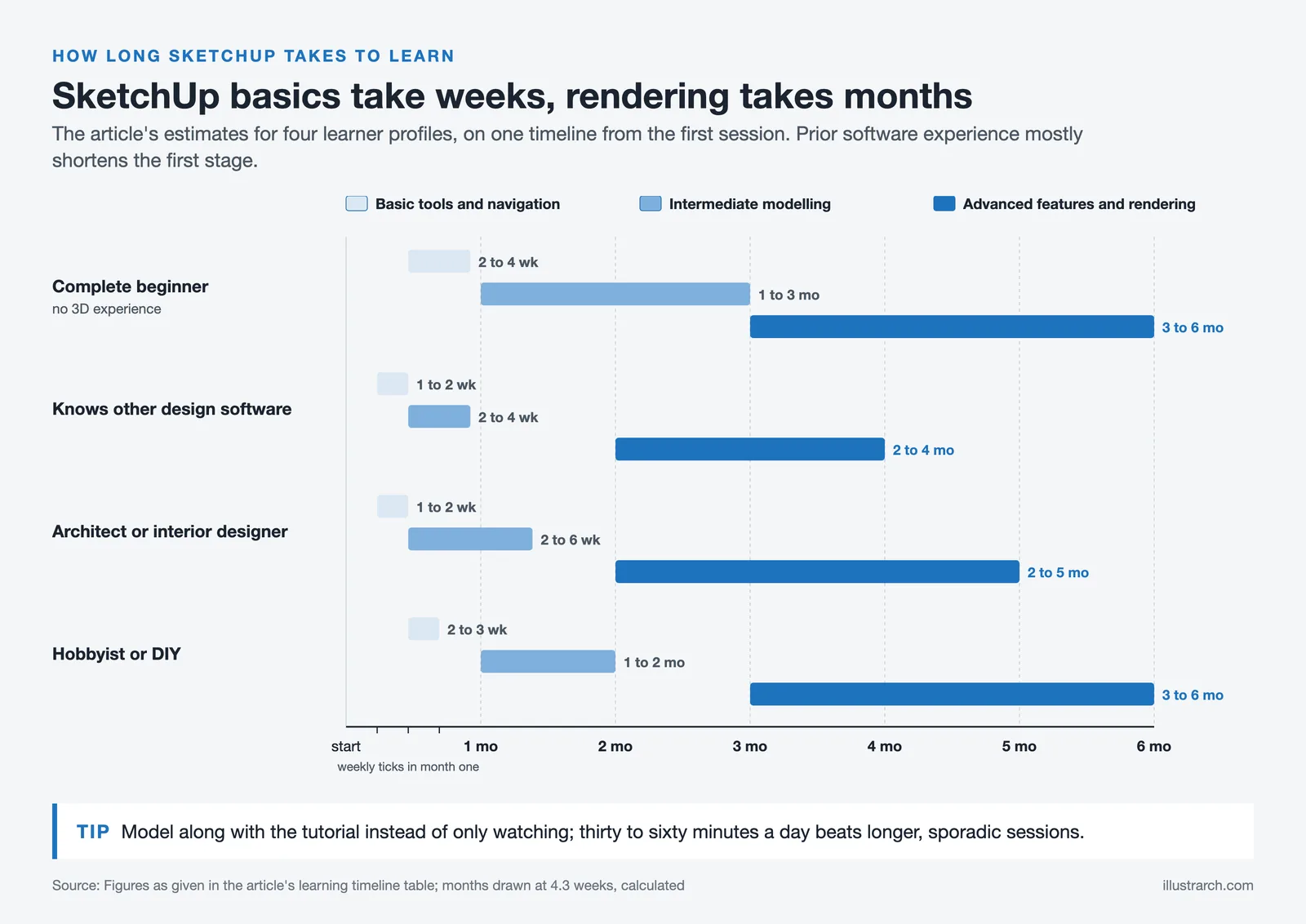
Those with experience in other design software often progress faster, potentially grasping the interface and fundamental tools within one to two weeks. Advanced features like complex geometric operations, detailed architectural modeling, and photorealistic rendering typically require three to six months of dedicated practice. The key is consistent engagement rather than sporadic learning sessions.
| Learner Profile | Basic Tools & Navigation | Intermediate Modeling | Advanced Features & Rendering | Recommended Channels |
|---|---|---|---|---|
| Complete Beginner (no 3D experience) | 2 – 4 weeks | 1 – 3 months | 3 – 6 months | The SketchUp Essentials, SketchUp (Official) |
| Experienced in Other Design Software | 1 – 2 weeks | 2 – 4 weeks | 2 – 4 months | SketchUp School, Brightman Designs |
| Architect / Interior Designer | 1 – 2 weeks | 2 – 6 weeks | 2 – 5 months | AF Channel, Egypt SketchUp Community |
| Hobbyist / DIY Enthusiast | 2 – 3 weeks | 1 – 2 months | 3 – 6 months | MasterSketchUp, Tutorials Up |
Many learners ask whether they can learn SketchUp by themselves, and the answer is definitively yes. YouTube tutorials, combined with the official SketchUp Campus resources, provide everything needed for self-directed learning. The software’s intuitive design means that motivated individuals can make significant progress without formal instruction.

Is SketchUp Easy to Learn? Understanding the Learning Curve
SketchUp has earned a reputation as one of the more approachable 3D modeling applications. Its push-pull technology allows users to transform 2D shapes into 3D forms through simple mouse movements, mimicking natural drawing and building processes. This intuitive approach means beginners can start creating basic models within hours of first opening the software.

However, the apparent simplicity can mask the depth of skill required for professional-level work. While basic modeling is straightforward, mastering areas like 3D rendering for architectural design, component management, and construction documentation requires sustained effort. The good news is that YouTube channels break down these advanced topics into digestible lessons.
| Software | Ease of Learning | Time to Basic Proficiency | Primary Use Case | Free Version Available |
|---|---|---|---|---|
| SketchUp | ⭐⭐⭐⭐⭐ | 2 – 4 weeks | 3D Modeling, Architectural Visualization | Yes (Web version) |
| AutoCAD | ⭐⭐⭐ | 1 – 3 months | 2D/3D Drafting & Technical Drawing | Free trial / Student |
| Revit | ⭐⭐ | 2 – 6 months | BIM & Construction Documentation | Free trial / Student |
| Blender | ⭐⭐ | 2 – 4 months | 3D Modeling, Animation, Rendering | Yes (Fully free) |
| Rhino | ⭐⭐⭐ | 1 – 3 months | NURBS Modeling, Parametric Design | Free trial |
| 3ds Max | ⭐⭐ | 3 – 6 months | Visualization, Rendering, Animation | Free trial / Student |

How to Learn SketchUp Fast: Advanced Tutorial Channels
For those looking to accelerate their learning, certain channels offer intensive content that covers advanced techniques and professional workflows efficiently.
Brightman Designs
Brightman Designs provides comprehensive tutorials teaching nearly every tool and command in SketchUp. Mike Brightman is one of only ten authorized Expert Trainers for SketchUp, and his content ranges from terrain modeling to fine rendering details. Particularly valuable is the coverage of SketchUp extensions and integration with tools like LayOut, ConDoc Tools, and Lumion. Learning to leverage extensions is crucial for anyone wanting to use SketchUp professionally.

2i-studio
For those interested in pushing creative boundaries, 2i-studio offers distinctive and original content focused on parametric architecture and unconventional designs. The tutorials explore how to create objects and structures outside typical modeling conventions using various plugins. This channel helps learners develop unique design approaches that set their work apart.

Egypt SketchUp Community (Mohammed Ahmed Ibrahem Mohammed)
This channel excels in detailed SketchUp modeling combined with V-Ray rendering instruction. Viewers can learn comprehensive rendering workflows and watch entire architectural projects developed from initial concept to final visualization. The detailed approach provides excellent insight into professional production standards for architectural rendering plugins.

Tutorials Up
Tutorials Up offers a vast amount of content ranging from tutorials to tips and tricks for SketchUp users of all experience levels. With over 159K subscribers and a frequent posting schedule of one video per week, this channel provides consistent learning material covering various aspects of 3D modeling and design.
MasterSketchUp
MasterSketchUp features tutorials for architects, interior designers, woodworkers, and anyone wanting to master the software from beginner to advanced levels. The instructor has live teaching experience with students worldwide and has been featured on numerous websites highlighting his expertise in SketchUp workflows.

| Channel | Subscribers | Specialty | Tools / Plugins Covered | Skill Level | Posting Frequency |
|---|---|---|---|---|---|
| Brightman Designs | — | Comprehensive SketchUp Training | LayOut, ConDoc Tools, Lumion, Extensions | Intermediate → Advanced | Regular |
| 2i-studio | — | Parametric & Unconventional Design | Various parametric plugins | Advanced | Regular |
| Egypt SketchUp Community | — | Modeling + V-Ray Rendering | V-Ray, rendering plugins | Intermediate → Advanced | Regular |
| Tutorials Up | 159K+ | Tips, Tricks & General Tutorials | SketchUp core tools | All Levels | ~1 video/week |
| MasterSketchUp | — | Architecture, Interior, Woodworking | SketchUp core + workflows | Beginner → Advanced | Regular |
Learning SketchUp: Essential Tips for Success
Maximizing your learning from YouTube tutorials requires an active approach rather than passive viewing. Open SketchUp and model alongside the instructor instead of simply watching. This hands-on practice reinforces concepts and builds the muscle memory needed for efficient workflow.
Learning keyboard shortcuts early significantly accelerates your modeling speed. Most tutorial channels demonstrate shortcuts as they work, so pay attention to these time-saving techniques. Create a YouTube playlist of valuable lessons you want to revisit, organizing content by skill level or topic for easy reference.
Consider combining multiple learning resources. While YouTube provides excellent free content, the official SketchUp documentation and community forums offer additional support. Many learners also benefit from project-based learning, where they apply tutorial techniques to their own design challenges rather than simply replicating instructor examples.

Best Way to Learn SketchUp: Combining Resources
The most effective learning strategy combines YouTube tutorials with practical application. Start with a clear goal for what you want to create, whether that’s architectural visualization, product design, or concept diagrams. This focus helps you select relevant tutorials and maintain motivation throughout the learning process.
Supplement YouTube learning with the official SketchUp resources. The SketchUp website offers extensive documentation, and the SketchUp Community forum provides a space to ask questions and learn from experienced users. Many professionals recommend spending time in the 3D Warehouse exploring how others construct their models, which provides insight into efficient modeling strategies.
Regular practice remains the most critical factor in mastering SketchUp. Even brief daily sessions of thirty to sixty minutes produce better results than longer but sporadic study periods. Consistency builds skills faster than intensity, and the structured format of YouTube tutorials makes it easy to progress through content systematically.
| Channel | Subscribers | Best Skill Level | Category | YouTube Link |
|---|---|---|---|---|
| The SketchUp Essentials | 586K+ | Beginner → Advanced | General / Beginner | Visit Channel |
| SketchUp School | 303K+ | Intermediate → Advanced | General / Professional | Visit Channel |
| SketchUp (Official) | 632K+ | All Levels | Official / General | Visit Channel |
| AF Channel | 160K+ | Beginner → Intermediate | Interior Design | Visit Channel |
| ACreate | — | Beginner → Intermediate | Interior Design | Visit Channel |
| Rio Ryne | 156K+ | Beginner → Intermediate | Interior Design | Visit Channel |
| Brightman Designs | — | Intermediate → Advanced | Advanced / Extensions | Visit Channel |
| 2i-studio | — | Advanced | Advanced / Parametric | Visit Channel |
| Egypt SketchUp Community | — | Intermediate → Advanced | Advanced / Rendering | Visit Channel |
| Tutorials Up | 159K+ | All Levels | General / Tips & Tricks | Visit Channel |
| MasterSketchUp | — | Beginner → Advanced | General / Multi-discipline | Visit Channel |
Conclusion
Learning SketchUp through YouTube offers an accessible, free path to mastering one of the most versatile 3D modeling programs available. From The SketchUp Essentials for comprehensive beginner instruction to specialized channels like 2i-studio for advanced techniques, the platform provides resources for every skill level. Combined with consistent practice and clear learning goals, these tutorials can transform anyone into a capable SketchUp user ready to create professional-quality architectural visualizations and designs.


1 Comment





Notion Alternatives for Architects: 7 Tools That Fit Studio Work
Notion works until a studio needs fee tracking, phase budgets and timesheets....
 Furkan Sen7 Mins read

Why Every Practice Ends Up With Five Versions of the Same Revit Family
Let’s learn why Revit family libraries accumulate duplicates, break schedules and slow...
 illustrarch Editoral Team5 Mins read

Visualizing Renovation Projects From Photographs: A Workflow for Existing-Building Work
Photo-based visualization turns a photograph of a building that already exists into...
illustrarch Editoral Team7 Mins read

Best Free CAD Blocks and Resources for Architects
A working guide to free CAD blocks for architects, covering ARCAT, CAD-Blocks.net,...
Furkan Sen7 Mins read


The idea that SketchUp can turn a novice into a confident user in just weeks is so inspiring! I’ve always felt overwhelmed by 3D modeling, but knowing I can grasp the basics in two to four weeks makes it seem possible. I’m definitely going to dive into The SketchUp Essentials channel, especially that video about tips and shortcuts—sounds like a game changer for my workflow!