

ArchiSnapper Review: Is This Field Report App Worth It for Architects?
A hands-on look at Deltek ArchiSnapper, the mobile app built for field reports and punch lists. This review covers its core features, iOS and Android workflow, current pricing, how it stacks up against PlanGrid, and the firms it serves best.
 Sinan Ozen24 August 20265 Mins read206
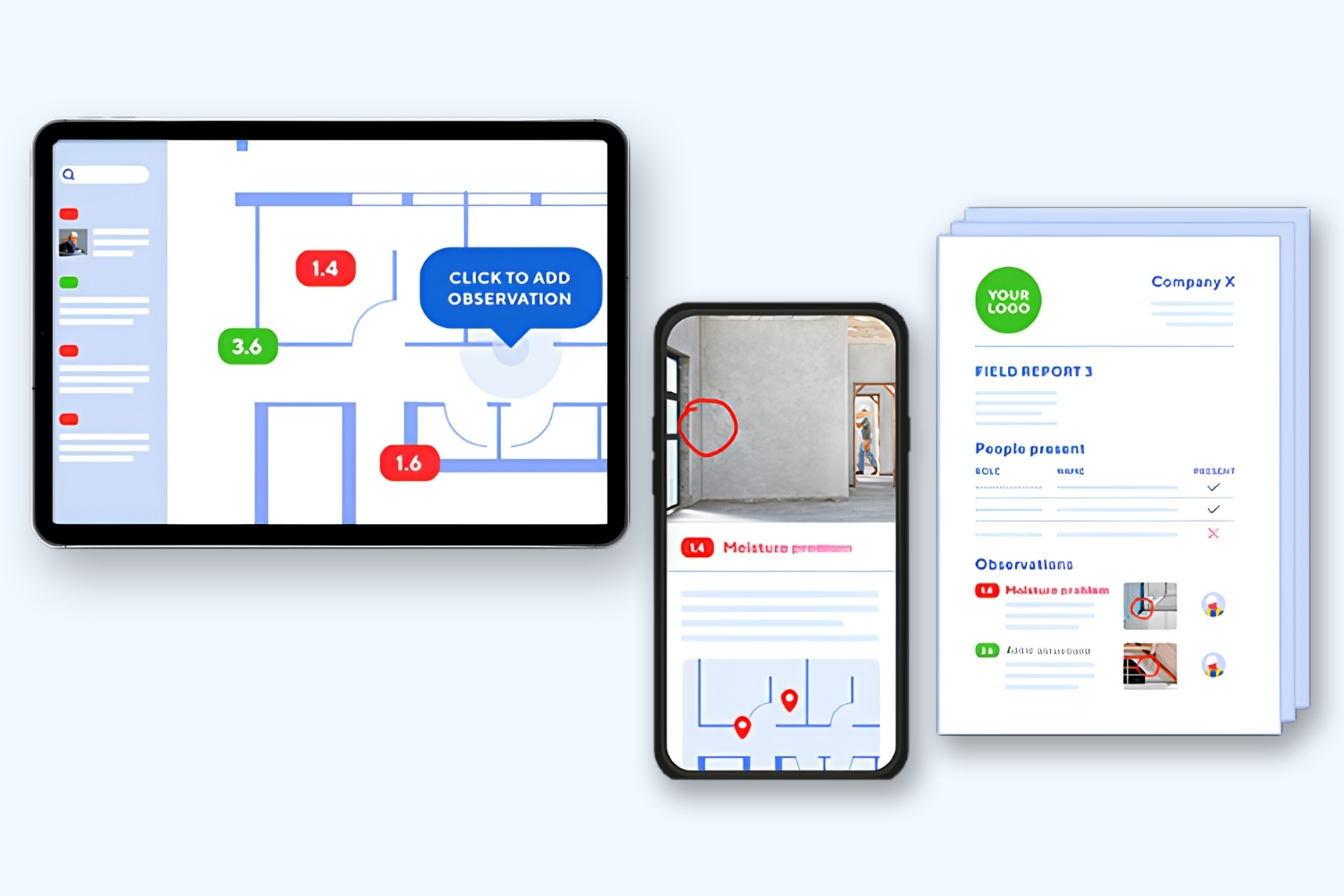
Table of Contents Show
ArchiSnapper is a mobile field report and punch list app for architects, engineers, and contractors, now part of Deltek. This ArchiSnapper review looks at how it captures site observations, annotates plans, and generates branded PDF reports in minutes, along with its pricing, how it compares to PlanGrid, and the firms it suits best.
Site visits create a pile of photos, scribbled notes, and half-remembered issues that turn into hours of desk work back at the office. ArchiSnapper set out to close that gap by letting you build the report while you walk the site. It has been around since 2013 and now sits inside Deltek’s project software lineup, so it is worth a fresh look at what it does well and where it stops.

What Is ArchiSnapper?
ArchiSnapper is a mobile app for field reports, site inspections, and punch lists, aimed at architects, engineers, and contractors. You capture photos, add notes, mark issues on floor plans, and the app assembles a clean, company-branded PDF report you can send before you leave the site.
The app was built by two developers working with a group of practicing architects, and its first version launched in 2013, as profiled by ArchDaily. It later joined Deltek, which now markets it alongside its accounting and project products for architecture and engineering firms. You can run ArchiSnapper on iOS, Android, or any web browser, so most teams capture observations on a phone or tablet on site, then finish reports from a laptop if needed. In our roundup of the best mobile apps for architects, it is the pick chosen specifically for site reporting rather than design work.
🔢 Quick Numbers
- More than 10,000 architects, engineers, and contractors use ArchiSnapper (Deltek ArchiSnapper, 2026).
- The first version of ArchiSnapper launched on April 1, 2013, developed with a group of practicing architects (ArchDaily, 2020).
- Deltek says ArchiSnapper saves 45 minutes on every site report by replacing manual processes with mobile reporting (Deltek, 2026).
Field Reports and Punch Lists: How ArchiSnapper Works
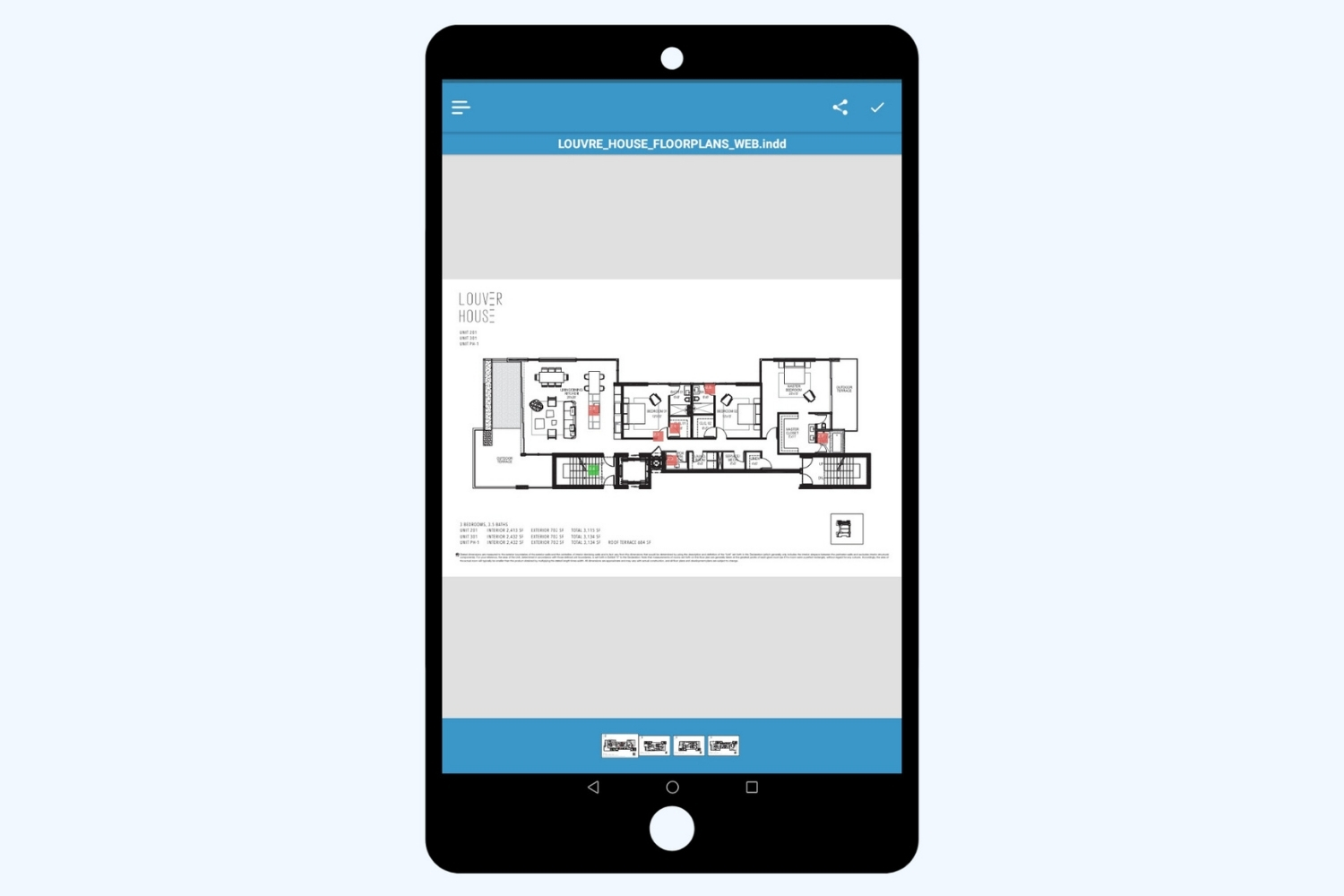
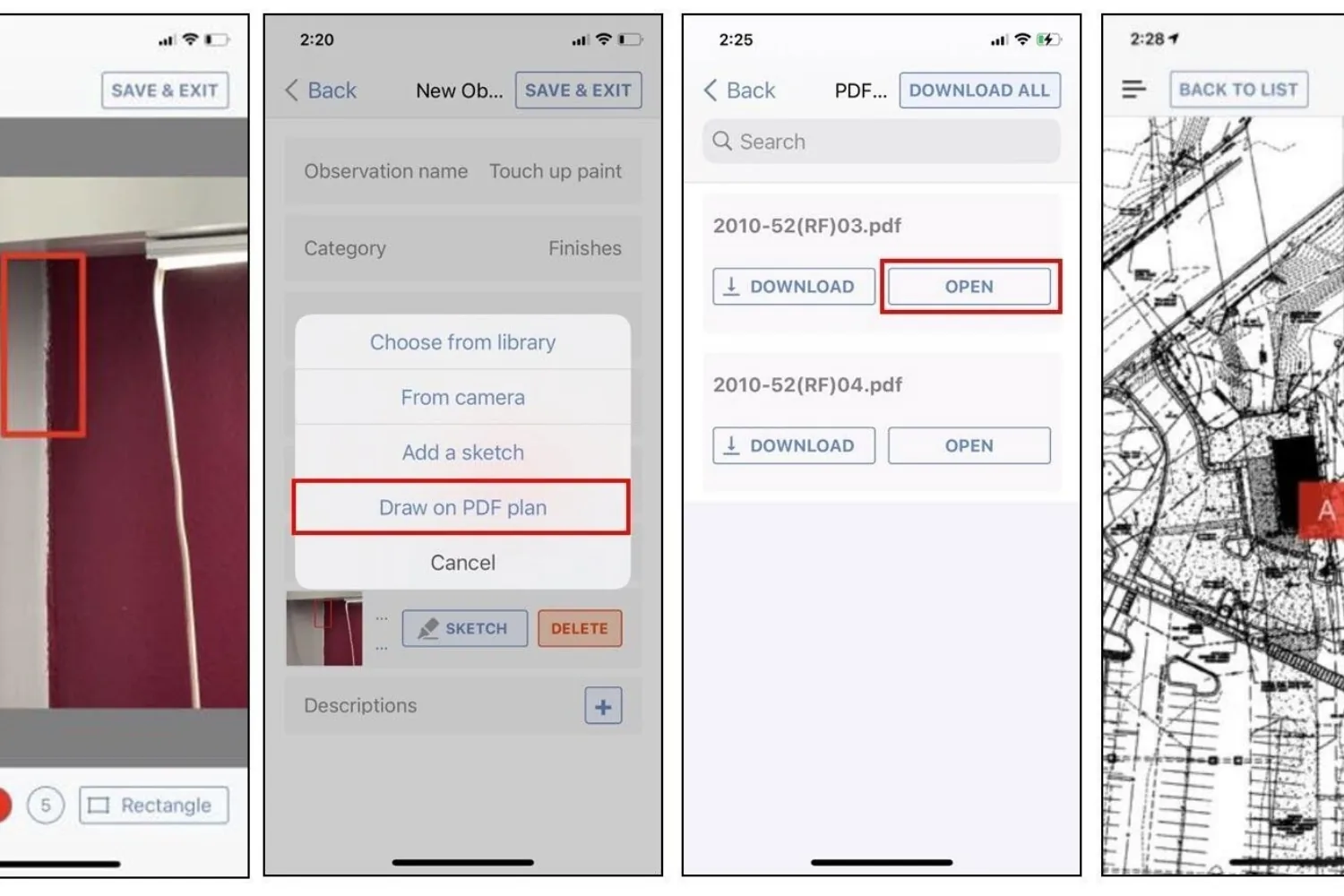
The workflow is deliberately short. On site, you open the project, snap a photo, and write or dictate a note using voice to text. You can sketch on the photo or on a drawing, then drop a numbered pointer on a PDF floor plan to show a contractor exactly where the issue sits. Each observation gets a status and can be assigned to a contact, so nothing floats without an owner.
Item numbering and cloning are handled for you. Start a new report from the previous one and recurring issues keep their numbers, which is how architects track whether a deficiency first flagged in report three is still open in report ten. When you finish the walkthrough, one tap produces a branded PDF with your logo and layout already applied. Assignees can reply on their items with text and photos, then submit them for approval, which is what turns a static punch list into a closed loop. Paper inspection sheets convert into digital checklists for repeatable site reviews. If plan markup is the part you care about most, our guide to apps for architectural plan drawing compares tools that specialize in it.
💡 Pro Tip
Set up your branded report template, observation categories, and any recurring checklists in the web app before your first site visit. Walking in with your logo and categories already configured means the PDF comes out client-ready on site, instead of needing a round of formatting back at the desk.
ArchiSnapper for Architects: Who It Fits
ArchiSnapper fits small to mid-size architecture and engineering practices most naturally, though contractors, safety professionals, and developers who run regular site documentation get the same benefit. Named clients range from large practices like Allies and Morrison to smaller firms such as Williams Blackstock Architects and Craine Architecture, which shows it scales from a solo reviewer to a larger team without much setup. The main strength is simplicity: reviewers who dislike software tend to accept it because there is little to learn.
The trade-off is scope. ArchiSnapper does field reporting and punch lists tightly, and it does not try to be a full project hub. For a wider view of the software a small practice actually needs, see our guide to architecture software for small firms, then treat ArchiSnapper as the site-reporting piece of that stack.
⚠️ Common Mistake to Avoid
Expecting ArchiSnapper to run your whole project. It is built for field reports, inspections, and punch lists, not RFIs, submittals, cost tracking, or scheduling. Teams that need a full construction platform should look at Autodesk Build or Procore, and keep ArchiSnapper as the focused site-reporting layer rather than a replacement for them.

ArchiSnapper vs PlanGrid: Which Field App Makes Sense in 2026?
Many teams still search for ArchiSnapper against PlanGrid, but the ground under that comparison has shifted. Autodesk acquired PlanGrid in 2018 for 875 million dollars and folded it into Autodesk Build inside Autodesk Construction Cloud. PlanGrid is now closed to new customers and sits in maintenance mode, and the PlanGrid Build mobile app was rebranded to the Autodesk Construction Cloud app, as Autodesk explains on its PlanGrid page. In practice, the honest 2026 comparison is ArchiSnapper against Autodesk Build.
PlanGrid earned its following with fast plan viewing and markup that held up on patchy site connections, and it covered issues, punch lists, RFIs, and submittals. Autodesk Build carries those forward and adds document control, cost, scheduling, and model coordination, but it is a heavier platform to set up and its per-user pricing climbs quickly for larger teams. ArchiSnapper stays narrow by design and keeps the branded PDF report at the center. Both apps run well on an iPad, which has become a common site device, and our list of the best architecture apps for iPad covers the wider set of tools that pair with either one.
ArchiSnapper vs PlanGrid at a Glance
The table below sums up the practical differences for a firm choosing between a focused field app and a full platform.
| Feature | ArchiSnapper | PlanGrid / Autodesk Build |
|---|---|---|
| Primary focus | Field reports and punch lists for A&E firms | Plan markup plus full construction management |
| Platforms | iOS, Android, web | iOS, Android, web via the Autodesk Construction Cloud app |
| Availability for new users | Actively sold and updated | PlanGrid closed to new customers, replaced by Autodesk Build |
| Branded PDF field reports | Built in, one click | Possible, inside a heavier document workflow |
| Learning curve | Light, minimal setup | Steeper, broader platform to configure |
| Best fit | Small to mid-size architecture and engineering practices | Contractors needing RFIs, cost, and scheduling |
| Pricing model | Per user subscription, quoted by Deltek after a 14-day free trial | Per user, quote based, higher at scale |
How Much Does ArchiSnapper Cost?
Deltek does not publish a per-user price on its ArchiSnapper page (as of October 2026). What it does offer is a 14-day free trial, which is the practical way to test the app on a live project before you ask Deltek for a quote for your team size.
The value verdict in this ArchiSnapper review is straightforward. Reviewers tend to rate it highly, since the monthly cost is small against the hours saved when a report is finished on site instead of rebuilt in Word or Excel. The one recurring complaint is offline handling on remote sites, where a weak signal can slow photo processing and plan access. If you are pricing out a solo or small-studio toolkit, our list of digital tools for independent architects puts a subscription like this in context alongside the rest of a practice’s software. Trial sign-up and plan details are on the official ArchiSnapper page at Deltek.
Pricing is quoted by Deltek and can change by plan, billing term, and team size. Confirm current figures with Deltek before subscribing.
The Bigger Picture
ArchiSnapper’s real appeal is what it chose not to become. As PlanGrid disappeared into a much larger Autodesk platform, plenty of small practices found themselves paying for scheduling, cost, and model tools they rarely open. An app that handles field reports and punch lists cleanly, then gets out of the way, is a reasonable answer to that drift, and it explains why single-purpose site tools still earn a spot on the home screen.






Foster + Partners to Test Robot Swarms Building Timber from the Top Down
Foster + Partners wins €4m EU grant to build robot and drone...
 illustrarch Editoral Team2 Mins read

PLNAR Review: Does AR Measurement Hold Up on a Real Site Visit?
PLNAR began as a consumer AR tape measure and now runs as...
Sinan Ozen5 Mins read

Gross Internal Area and Net Internal Area: What’s the Difference?
The difference between Gross Internal Area and Net Internal Area shapes how...
Sinan Ozen5 Mins read

How to Annotate Architectural Drawings Correctly: A Practical Guide
A practical walkthrough of how to annotate architectural drawings, covering the right...
Sinan Ozen9 Mins read


Leave a comment