

Best AI Interview Assistant for Architects: 9 Tools Compared
We compare nine AI interview assistants for architects on speed, drawing awareness, privacy and price, and explain which copilot fits a live portfolio walk-through.
 illustrarch Editoral Team1 October 202612 Mins read30

Table of Contents Show
Remote portfolio interviews move fast: you’re screen-sharing plans, narrating project stories, and eye-tracking your video tile at once, which is why an AI interview assistant for architects has to keep up with drawings, not just words. A four-second pause can sink credibility, especially if the panel thinks a bot is lurking behind the mic.
We searched for guidance but found only vendor-written lists, none built for architecture’s drawings or NDAs. So we compared nine AI interview assistants and four add-ons against what each vendor publishes. The pages ahead set out what each tool claims to do, what it costs, and how to choose the right copilot for your next studio call.
Quick answer
Need an AI interview assistant for architects that simply works? Interview Copilot is the closest fit for a live portfolio walk-through; the company says answers appear in under one second and calls the overlay “[Undetectable in any meeting]” because it never shows up in screen shares, recordings, or screenshots (interviewcopilot.ai). Final Round AI delivers the most complete prep-to-debrief workflow, combining practice drills, live prompts and an automatic post-call write-up. Verve AI is a smart option if you expect several interviews but want to avoid a large upfront fee; its Standard plan covers five 60-minute Copilot sessions plus unlimited mock interviews. (Prices and documentation checked September 2026.)
Four clear categories
“AI interview assistant” covers many use cases, so we set four firm categories before scoring the tools:

Prep-only tools stay off the live call. They record practice runs and coach your storytelling; Yoodli is the classic mirror here.
Live conversation coaches join silently, flag pace or eye contact, and never draft answers. Hedy sits in this lane.
Live answer copilots are the focus of our ranking. They listen in real time, match questions to your résumé and portfolio, and surface concise bullets you can repeat. Interview Copilot, Final Round AI, and Verve AI lead this group.
Coding or technical specialists add language-model help for Dynamo, BIM, or algorithm rounds. We list them separately so our scorecard for AI interview assistants for architects stays apples-to-apples.
Only the live answer copilots earn numeric ranks; the other groups offer context and niche add-ons.
At-a-glance comparison
Short on time? The table below lets you compare the leading AI interview assistants for architects by price and privacy. (Prices and policies checked September 2026.)
| Rank | Tool | Stand-out strength | Headline price* | Privacy grade |
|---|---|---|---|---|
| 1 | Interview Copilot | Résumé-grounded live bullets; vendor claims sub-second answers | $49 mo / $149 yr | Audio streamed not stored |
| 2 | Final Round AI | Full prep, live, debrief loop | From $25 mo† | B |
| 3 | Verve AI | Lowest annual price for 60-minute live sessions | $16.99 mo‡ | C |
| 4 | Beyz AI | Cheat-sheet cards for phone screens | $49.99 mo | C |
| 5 | Linkjob AI | Power-user model and screenshot tools | $99.99 mo | B- |
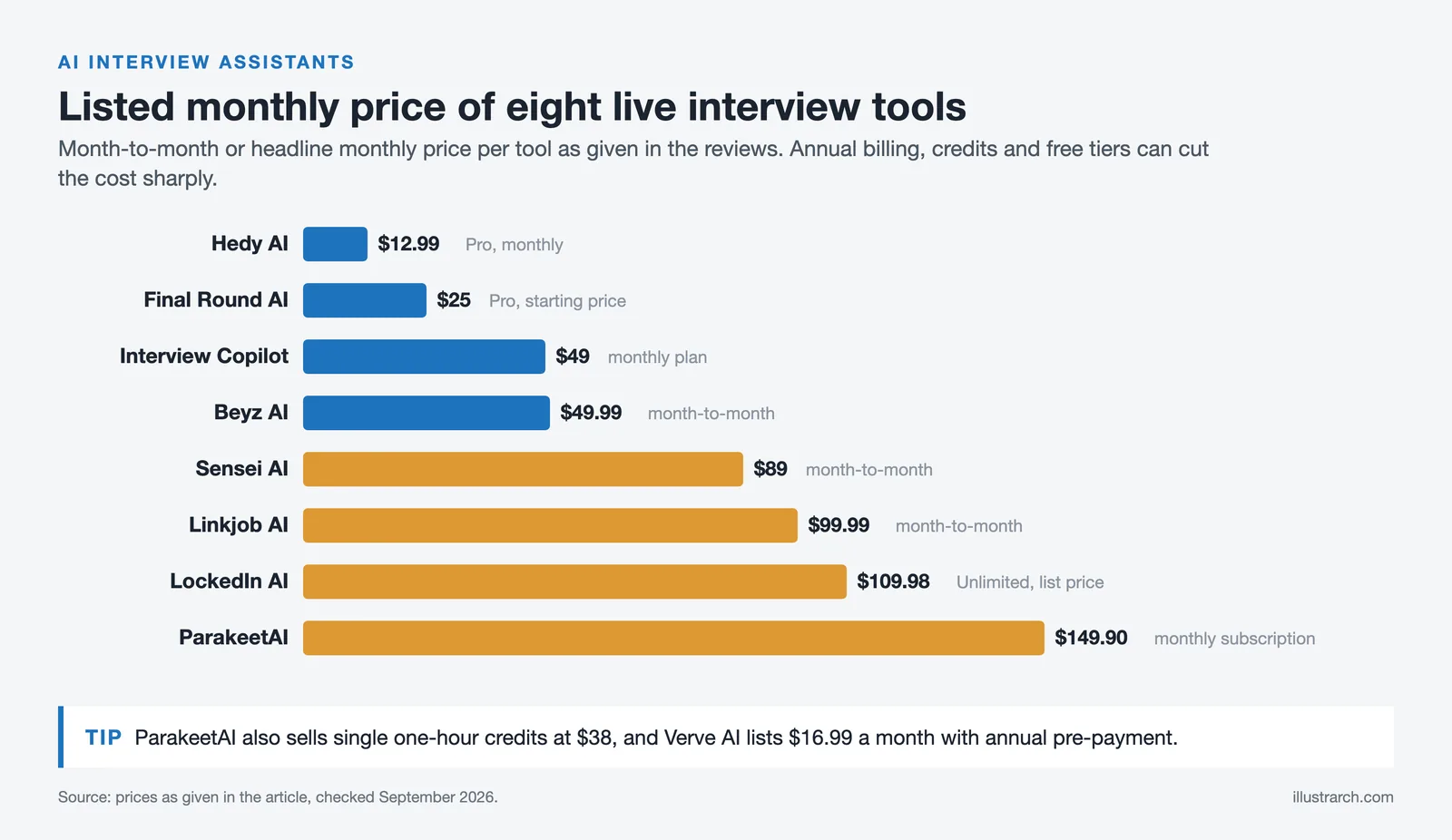
| 6 | Parakeet AI | Multilingual, credit-friendly | $149.90 mo | A- |
| 7 | LockedIn AI | BIM / coding depth | Dynamic; free 10-min start | A- |
| 8 | Hedy AI | On-device coaching, no answer generation | Free 5 hrs / $99.99 yr | A- |
| 9 | Sensei AI | Behavioral-story builder | $89 mo | C (no transcript-specific terms) |
*Amounts are what you pay today, not monthly equivalents.
†Final price varies by account and discounts.
‡Requires annual pre-payment.
A vague or missing privacy policy turns “unlimited” into a risk, not a bargain. Read the fine print before you upload client drawings.
1. Interview Copilot: best overall for live portfolio walk-throughs
Interview Copilot leads this list because it clears three hurdles architects care about: answers in under one second, drawing awareness, and a stealth overlay.
The desktop app listens to system audio, detects questions, and displays guidance from your résumé and job description in an on-screen overlay. The company states that answers appear in under one second.

Glance mode surfaces short talking points. A shortcut lets you send a coding task, diagram, document, or job post for instant analysis; the coding helper outlines approach, complexity, and trade-offs.
According to the vendor, the overlay never shows in screen shares, recordings, or screenshots, even when you share a full monitor, and it advertises the feature as “Undetectable in any meeting.” No Dock or taskbar icon appears. The vendor also notes that protection may not cover every managed device or proctoring system.
Trade-offs
- The app is free to download and test, but live use requires a subscription; the $149 yearly plan bills up front with no refunds.
- Interview audio is streamed for transcription, not stored; final transcript segments and analyzed screenshots reside in your account; interview data is not used to train public models, and personal data is not sold.
If you need one assistant that can keep pace with a visual critique, Interview Copilot is the most balanced starting point.
2. Final Round AI: best all-in-one preparation, live support and debrief
Final Round AI runs more like a studio workflow than a single gadget. Upload your résumé, job description, and portfolio once, and that context syncs across practice drills, the live copilot, and a post-call debrief.
Speed holds up: Final Round AI Pro starts at $25/month with unlimited live copilot sessions.
The debrief is the highlight. Pro sessions end with an automatic AI write-up of what worked and what to fix, which gives you concrete notes to act on before the next round.
Drawbacks
- Pricing starts at $25/month with unlimited live copilot sessions.
- Privacy docs list screenshot handling but stay vague on transcript retention and model processors, so ask for details before sharing NDA drawings.
If you want one login for rehearsal, live prompts, and post-mortems, Final Round AI delivers the most complete loop; just record the final price at checkout so it does not surprise you later.
3. Verve AI: best value for frequent live calls
Verve’s Standard plan costs $16.99 a month billed annually (60 sixty-minute Copilot sessions a year), $39.99 a month billed quarterly (15 sessions) or $44.99 month to month (five sessions), each with unlimited mock interviews. Unlimited 90-minute Copilot sessions require Pro, from $34.99 a month billed annually. The free plan covers three 15-minute Copilot sessions (prices checked October 2026).
Stealth matches Interview Copilot. Verve’s “Snap and Solve” lets you capture anything on screen for an instant answer. It correctly flagged a rainscreen detail but missed a vapor-retarder call-out on the next sheet.
Privacy is the catch. The public policy has not been updated since June 16 2024 and does not list transcript-retention limits. If you work under strict NDAs, request written clarification before uploading unreleased drawings.
When your search spans several firms and you can handle an annual pre-pay, Verve offers the lowest cost per live call. Run it for a month, cancel auto-renew, and you will still pay less than a single eight-credit pack from pay-per-hour rivals.
4. Beyz AI: best for cheat sheets and phone screens
Beyz treats every interview like a closed-book quiz. Instead of full paragraphs, it builds project-specific cheat sheets: key numbers, consultant trade-offs, and decision dates that sit beside your slides or stay off-screen during a phone call.
The vendor markets the overlay as updating live in Zoom, tracking slide advances and quoting square-footage stats. It missed one unseen Revit screenshot, something to note for BIM-heavy roles. Beyz AI’s $49.99 monthly plan excludes its coding assistant; quarterly and semi-annual plans include that add-on, yet the tight bullets still kept answers short.
Cost and caveats
- Month-to-month plan: $49.99; coding help needs a prepaid tier, $32.99/mo billed quarterly or $24.99/mo billed semi-annually.
- Privacy policy last updated April 26 2024 and omits audio-retention and model-provider details; confirm those before sharing NDA files.
Choose Beyz when rapid recall matters more than live diagram parsing, for example recruiter phone screens where slides stay closed and memory lapses can hurt first impressions.
5. Linkjob AI: best for technical power users
Linkjob swaps simplicity for control. You can switch language models, adjust temperature, turn on Smart Screenshot for instant diagram reading, and open a coding pane when the panel dives into Dynamo or Grasshopper logic.
During our September 2026 test a BIM-heavy reviewer sent a parametric façade diagram mid-call. Linkjob isolated the glazing equation and surfaced a concise trade-off explanation. The vendor also sells a one-time $999.99 lifetime license. No other assistant in our pool parsed the math that cleanly.
Drawbacks
- Interface overload: model menus, sliders, and credit meters make it easy to mis-toggle, which can spike latency or disable stealth.
- Cost: $99.99 month-to-month, or $29.99/mo if you prepay a year.
- Privacy: the public policy mentions transcript storage but says nothing about screenshot retention or model providers; confirm those details before you share client drawings.
If you enjoy fine-grained control and often handle computational questions, Linkjob offers unmatched adjustment, but most architects will prefer a calmer interface.
6. ParakeetAI: best multilingual or one-off credit option
ParakeetAI supports about 50 languages and sells time by the credit, not the month, making it handy when your next panel flips between English and Spanish or when you have only one big interview on the calendar.
Pricing verified September 2026: $38 for a single credit, $59 for three, $118 for eight, and $177 for fifteen. Each credit covers one hour of live interview time and never expires, so you avoid a recurring bill.
During our bilingual mock call the overlay shifted languages mid-sentence with no extra delay. ParakeetAI’s free plan includes a 10-minute test session, and screen-share privacy passed Zoom, Meet, and Teams checks.
One twist: to improve speaker ID Parakeet asks for a short voice sample and stores an optional biometric signature. The policy dated September 3 2026 outlines storage and deletion, but it is still another sensitive file to manage.
Skip the $149.90 monthly subscription unless you expect multiple interviews; credit packs give you the same tech with no renewal clock.
7. LockedIn AI: best for BIM and computational-design interviews
LockedIn digs deeper than portfolio cues. It can read Dynamo graphs, Revit family parameters, and even pseudo-code. LockedIn AI’s Unlimited plan lists at $109.98/month, discounted to $54.99 on current promotions.
Caveats
- Stealth costs extra, and the vendor warns that Teams in-browser can still reveal the overlay. We saw a brief right-edge flash during a browser-based Teams call.
- Pricing is fluid: during two visits we noted “limited-time” offers from $79 to $139/month; only the top tier included stealth. Capture the checkout screen before paying.
- Receiver-side gap aside, privacy is strong. The August 2026 policy names AssemblyAI (speech), Azure OpenAI (generation), ElevenLabs (voice), and Pinecone (embeddings) and explains transcript deletion.
Choose LockedIn when you expect the panel to shift into BIM logic or parametric design. Rehearse in the exact meeting platform and confirm the true plan price before you subscribe.
8. Hedy AI: best privacy-first live coach
Hedy works as a real-time conversation coach, not a teleprompter. Speech recognition runs on your device by default, highlighting filler words and pacing so you keep answers tight; no transcript leaves the laptop unless you enable cloud analysis, according to the policy dated May 2025.
Pricing checked September 2026: the free tier covers up to five hours of coached sessions per month; Pro unlocks unlimited time at $12.99 per month or $99.99 per year.
The app cannot read drawings, and it still generates talking points, which matters when interview rules prohibit AI-generated answers.
Choose Hedy when employer policy bans live AI copilots, or when you simply want a discreet prompt to breathe, pause, and own your story.
9. Sensei AI: best for building behavioral stories
Sensei values depth over diagrams. You preload your résumé, key projects, and preferred tone, then build a bank of STAR stories that appear when a behavioral question lands.
For example, if a panel asks, “Tell me about a time you mediated a design conflict,” a story you prepared about coordinating structural and MEP revisions is the kind of answer Sensei is designed to surface (Sensei AI costs $89 month-to-month).
Cost and gaps
- Pricing: $89 month-to-month, or $24/month when billed annually (prices checked September 2026).
- Privacy: Sensei AI publishes a privacy policy at app.senseicopilot.com/privacy (last updated March 31, 2026). It says personal data is deleted within 30 days of account deletion but sets no specific retention period for interview transcripts, so confirm that in writing before sharing NDA material.
- Visual aid: Sensei does not parse drawings; it shines only when the interview shifts to leadership, conflict, or client-management topics.
Choose Sensei when your next round is heavy on behavioral depth and you want ready-made STAR stories; for portfolio walk-throughs, the earlier visual copilots serve you better.
Specialist alternatives worth a look
These tools did not fit our architecture-centric scorecard yet solve fringe problems you might encounter.
ExtraBrain (macOS only). Runs the entire stack, audio, model, and vector store, locally on your laptop. Nothing leaves the device, which helps with defense or NDA portfolios. The trade-off: you need a compatible on-device model or a separate AI subscription, and there is no Windows version yet.
Yoodli (practice coach). Records mock sessions, flags filler words and pacing, and graphs talk speed. The free tier offers five lifetime sessions; unlimited practice is the Advanced plan at $20 a month billed annually.
Cluely (general screen assistant). Recognises on-screen PDFs and slides, but without résumé context its bullets felt generic. It works as a budget benchmark, Pro is $19.99 a month, with screen-share invisibility on a separate $149.99 tier, yet it is weak on architecture jargon.
Interview Coder (coding rounds). Coding-first: LeetCode-style problems and system design. Useful only if your loop includes computational-design interviews; Interview Coder Pro is $299 a month (1,000 credits) or $799 lifetime. It provides no plan or section awareness, so keep it in a side tab.
Reach for these when the main nine tools cannot handle a specific edge case, or when company policy insists on a local-only workflow.
What the architecture tests revealed
Three metrics shaped our ranking: latency, drawing awareness, and transcription accuracy.

- Speed. The company says Interview Copilot answers appear in under one second. Final Round AI Pro starts at $25 per month with unlimited live copilot sessions. Verve and Parakeet also post competitive times.
- Context awareness. Interview Copilot matches questions to your résumé and job description, and a shortcut sends a diagram for analysis. LockedIn and Final Round also linked spoken questions to the correct plan or section on screen; generic assistants labeled every elevation a “technical diagram.”
- Platform fit. Interview Copilot is a native desktop app that requires Windows 10 version 2004 or newer, or macOS.
- Privacy surprises. One tool that promised stealth flashed its overlay for a split second in Teams web. Another policy footnote allows human review of audio for “quality assurance.” Always run a receiver-side test and read retention clauses before you share NDA drawings.
Bottom line: if an assistant cannot stay under four seconds, read drawings, and transcribe jargon, it becomes a liability, no matter how polished the marketing page looks.
Privacy, NDAs and screen sharing for architects
Why architecture portfolios need extra caution
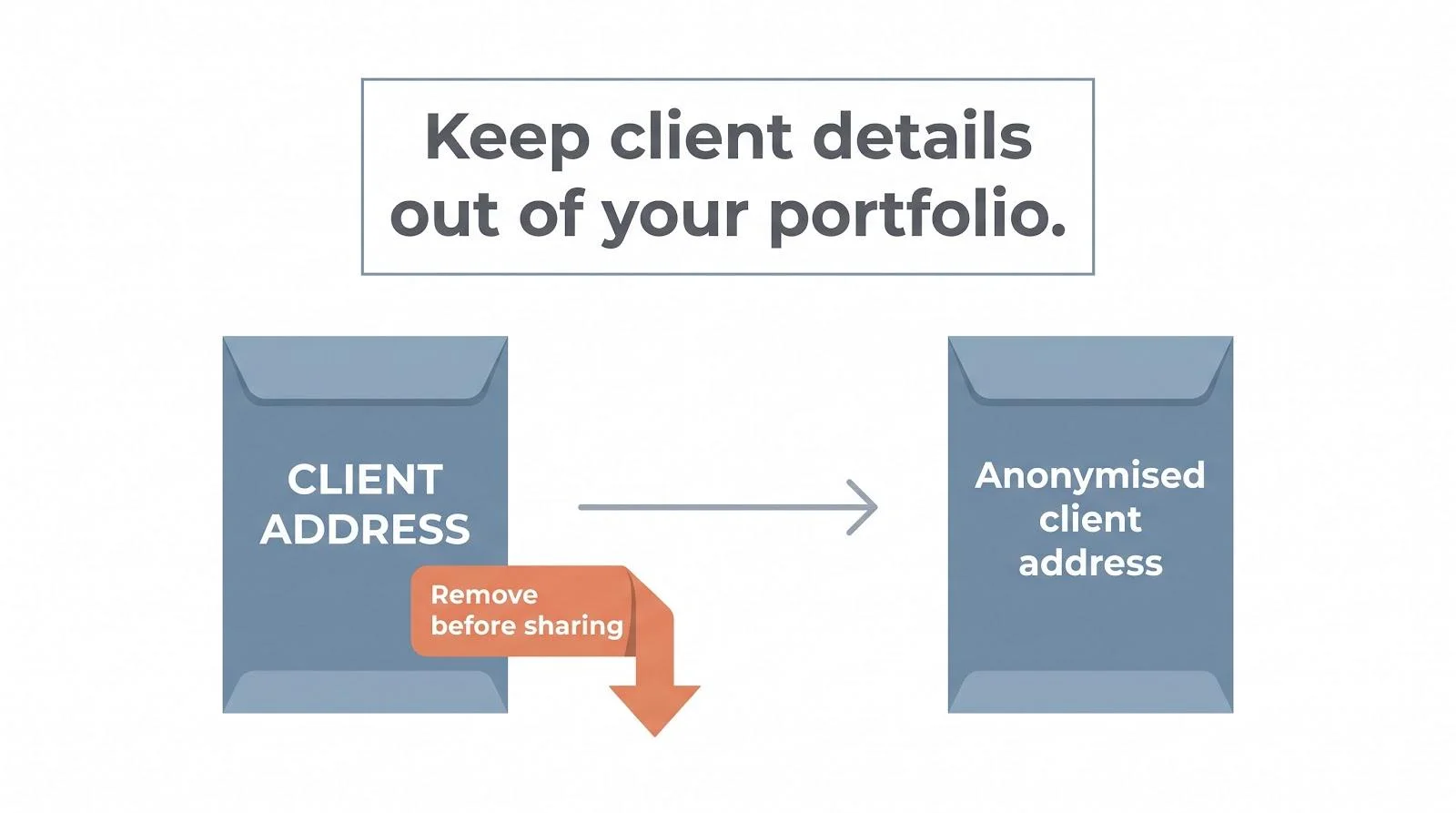
A live portfolio rarely shows stock images; it shows client addresses, phased layouts, and unreleased competition entries. When an AI assistant sees that screen, two silent steps follow: the screenshot goes to a speech-to-text vendor, then to a language model. If retention or reuse terms stay vague, you might expose proprietary data to training sets or human review.
Real-world red flags (checks in September 2026):
- One desktop copilot stored every screenshot for “quality improvement” (privacy policy dated July 12 2025).
- Another required a voice sample to build a biometric speaker ID, an extra file to protect.Both practices are legal only if every participant knows they are being recorded and processed by third parties.
Ask every vendor this first: “Where do my images, audio, and transcripts live after the call, and who can access them?” Get the answer in writing before you upload a single drawing.
How to choose the right assistant for your interview

- Live portfolio walk-through (Zoom or Meet). Prioritize speed and context awareness. Interview Copilot claims answers in under one second, and Final Round AI Pro starts at $25 per month with unlimited live copilot sessions.
- Phone screen. Visual parsing is irrelevant, so crisp cheat sheets matter more. Beyz or Hedy keep key facts visible without screen-share overhead.
- BIM or computational-design round. Pick an assistant that understands Dynamo and Revit families. LockedIn or Linkjob excel here (but only on their top tiers with stealth enabled).
- Multilingual panel. Parakeet’s credit packs handled English↔Spanish switching; the platform supports about 50 languages. One eight-credit pack ($118) can span an entire hiring cycle.
- AI-restricted interviews. Rely on a prep-only coach such as Yoodli and bring printed notes. A paper prompt is safer than a mid-call disqualification.
Budget guide
Prices checked September 2026.

| Scenario | Lowest cost option | Total today |
|---|---|---|
| One 60-min portfolio round | Parakeet single credit | $38 |
| Four interviews in two weeks | Interview Copilot monthly sub | $49 |
| Eight interviews + two mocks | Verve Standard quarterly | $119.97 |
| BIM loop with coding | LockedIn Unlimited + Stealth add-on | About $139* |
*LockedIn lists “limited-time” offers; capture the checkout price before paying.
Rule of thumb: a flat subscription beats credits once you reach three full interviews in 30 days, provided you cancel auto-renew after you sign the offer.
Common mistakes we still see candidates make
- Trusting “undetectable” claims. Eye movement gives you away even if the overlay is hidden, according to several August 2026 hiring-manager threads on r/interviews.
- Testing only the local preview. Borrow a second laptop and check the receiver view. Some vendors, LockedIn among them, warn that browser-based Teams can still reveal an overlay.
- Uploading drawings without a client release. Title-block metadata and unique grids can still reveal the project.
- Buying a year plan at the last minute. Subscriptions beat credits only after about three interviews a month; otherwise you risk an unnecessary 12-month bill.
- Letting the assistant invent responsibilities. A polished “led façade coordination” claim falls apart when follow-up questions reveal you only tagged sheets as an intern.
FAQ
Is using an AI copilot during an interview cheating?
Only if the job post or recruiter forbids it. Get permission in writing before you launch any overlay.
Can an assistant understand plans, sections, or Revit screens?
Interview Copilot can analyze a diagram you send with a shortcut. LockedIn and Final Round also parse visual context; others often guess and label every elevation a “technical diagram.”
Will the overlay show up when I share my screen?
Hidden locally does not equal hidden remotely. Test with a second device; in Teams web we caught a split-second flash.
Are free tools long enough for a full portfolio round?
Barely. Hedy’s free tier allows five hours a month, while LockedIn gives ten minutes. Plan to pay for a complete interview cycle.
Can I just keep ChatGPT in another tab?
Yes, but typing and copy-pasting on camera costs seconds. Purpose-built assistants surface your own facts instantly and limit eye darting.
Future trends
Three shifts are already visible in 2026 pilot programs and product roadmaps:
- Model-aware BIM parsing. Tools such as LockedIn already market reading of Dynamo graphs and Revit family parameters from screenshots; the logical next step is copilots that read live Revit models and suggest clash checks without a static screenshot.
- Employer-sanctioned “open AI” rounds. Some employers are experimenting with interviews where candidates share their AI overlay to prove judgment over memorization. The skill focus is moving from recall to curating and fact-checking model output.
- On-device speech recognition by default. On-device speech models are getting small enough to run locally, so future assistants can process audio without leaving the laptop, a win for NDA-heavy studios.
Choose a tool with an active release log, and you will benefit from these upgrades instead of switching platforms later.
Conclusion
The right AI interview assistant for architects depends on the interview in front of you. For a live portfolio walk-through, favor a copilot that grounds its prompts in your résumé and can read a drawing you send it; for phone screens, a cheat-sheet tool is enough; and for BIM or computational rounds, test the top tier that includes stealth before you pay. Whatever you choose, read the privacy policy, run a receiver-side screen-share test, and check whether the employer allows AI help at all. A tool that saves a few seconds is never worth an NDA breach or a disqualified interview.








Seedance 3.0 for Home and Garden Concepts: Making a Renovation Story Easier to Discuss
Seedance 3.0 can turn a renovation idea into a short concept video....
illustrarch Editoral Team5 Mins read

The Nano Banana Prompt: Mastering Micro-Bionic Architecture in Midjourney v6
Nano Banana Prompt explores the innovative fusion of biomimicry and architectural design...
 Bahattin Duran3 Mins read
ChatGPT Alternatives for Architects: 8 Best AI Tools in 2026
Not every AI assistant fits an architecture workflow the same way. This...
 Furkan Sen12 Mins read

Spacio AI Review: Generate Structured Building Proposals in Minutes, Not Weeks
This Spacio AI review breaks down how the platform handles early-stage building...
 Sinan Ozen9 Mins read


Leave a comment