

Architecture Resume Builders: 8 Best CV Tools for Students
Architecture students need a CV that parses cleanly in hiring portals and still sits comfortably beside a design portfolio. This comparison covers eight builders, the two versions worth keeping, and the errors that cost interviews.
 Elif Ayse Sen31 July 20268 Mins read406

Table of Contents Show
An architecture resume is a one page document that summarizes your education, software skills, and project experience for hiring architects, and it works alongside your portfolio rather than replacing it. The best resume and CV builders for architecture students balance clean parsing for applicant tracking systems with the typographic control that design employers expect.
Most resume advice was written for people applying to banks and software companies. Architecture hiring works differently. A studio principal often opens the portfolio first, glances at the CV second, and decides within seconds whether the two documents were made by the same person. That is the problem the tools below have to solve, and not all of them solve it equally well.
What Makes an Architecture Resume Different From a Standard One?

An architecture resume is read next to a visual document, judged partly on its layout, and filtered on software proficiency before anything else. Three things separate it from a generic professional resume.
First, it is never read alone. Your CV and your portfolio arrive in the same email, and a mismatch between them reads as carelessness. If your portfolio runs on a strict typographic grid and your CV uses a template with rounded icons and skill bars, the reviewer notices.
Second, software is a hard filter. Studios advertise for Revit, Rhino, Grasshopper, AutoCAD, and the Adobe suite by name, and a resume that buries these terms in prose can fail an automated keyword scan before a human sees it.
Software lists also need ordering. A studio hiring for a competition team reads Rhino and Grasshopper first, while a practice doing hospital work reads Revit and Navisworks first. Putting them in the order the job posting uses is a small edit that changes how quickly a reviewer finds what they came for.
Third, students rarely have job history to list. Studio projects, competition entries, workshops, fabrication labs, and teaching assistantships take the place of employment, which changes how the whole document is structured. Our guide to writing an architect CV with no experience covers that structure in detail.
What to Look for in an Architecture CV Builder

Five criteria separate a tool that helps from one that quietly costs you interviews.
- Parsing safety. Single column layouts, real selectable text, and standard section headings survive applicant tracking systems. Two column templates, text inside image boxes, and creative headings often do not.
- Export quality. You want a PDF under 2 MB with live text, plus a DOCX version for portals that reject PDFs.
- Typographic control. Can you set the typeface, the leading, and the margins, or are you locked into the template designer’s choices?
- One page discipline. Some builders push content onto a second page by default, which is the wrong instinct for a student CV. Our breakdown of architectural resume templates shows what a tight single page looks like.
- A real free tier. Several popular builders let you design for free and then charge at the download step, which is worth checking before you invest an evening.
🔢 Quick Numbers
- Recruiters spend an average of 7.4 seconds on an initial resume screen, up from 6 seconds in 2012 (Ladders Inc., 2018 Eye-Tracking Study)
- Nearly 40,000 candidates were actively working toward architectural licensure in the United States in 2024, a 5 percent rise on 2023 (NCARB by the Numbers, 2025 edition)
- The total number of licensed US architects fell 4 percent to 116,000 in the same year (NCARB by the Numbers, 2025 edition)
Read those numbers together and the picture is clear. The NCARB licensure data tells the structural story here. More people are entering the pipeline while the licensed population shrinks, and each application gets a few seconds of attention. Your CV has to survive a machine filter and then a very fast human scan.
The 8 Best Resume and CV Builders for Architecture Students

These eight tools cover the range from pure design control to pure parsing safety. Few students need all of them, but most need at least two, for reasons explained further down.
1. Canva
Canva gives you the most design freedom of anything on this list, with a large free template library and drag and drop editing that architecture students pick up in minutes. You can match your CV typeface to your portfolio, set your own margins, and export a print ready PDF.
The catch is parsing. Many Canva resume templates use two columns, decorative icons, and text placed inside shapes, all of which can scramble when a hiring portal reads the file. Use it for the version a human opens, and keep a simpler file for online forms.
2. Adobe Express

Adobe Express is the natural choice if your portfolio already lives in InDesign. The free template set is smaller than Canva’s, but the type and color handling feels familiar, and you can keep one visual system across your CV, cover letter, and portfolio cover.
3. Kickresume
Kickresume has the most usable free plan for students. The free tier includes four resume templates with matching cover letter designs and unlimited downloads, which is more than most competitors allow without payment. Templates are built to stay readable in automated screening.
💡 Pro Tip
Before paying for any builder, check whether it runs a student program. Kickresume states on its own site that students and teachers can get its Premium plan free with a qualifying school email address, which opens up the full template set at no cost. Several competitors run similar academic offers that are not advertised on the pricing page.
4. Enhancv
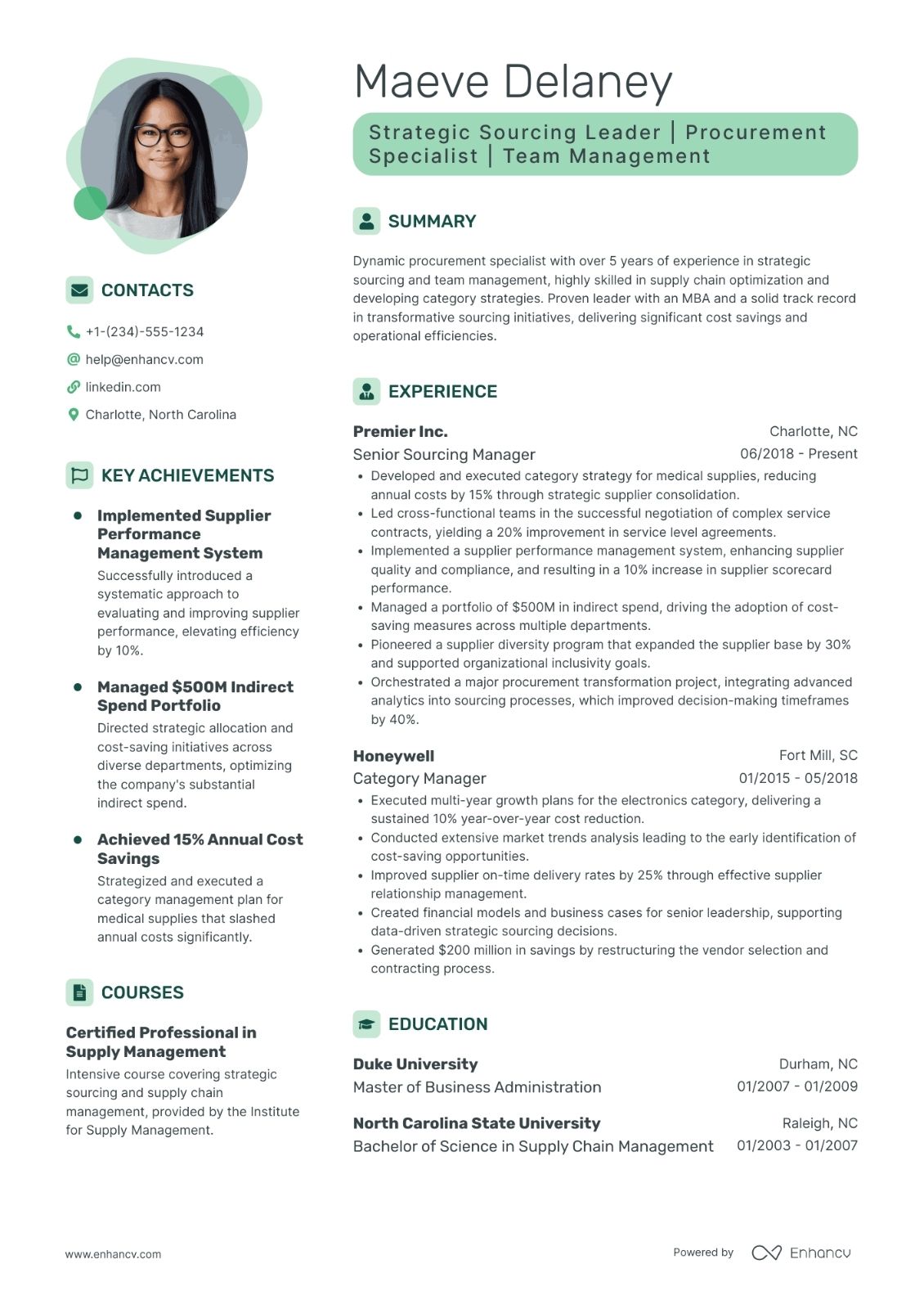
Enhancv is built around turning experience into achievement lines, which is exactly the weak point of most student CVs. Instead of writing “participated in studio project,” its prompts push you toward the scope, the tools, and the result. It also includes a check that compares your document against a job posting.
Design options sit between Canva’s freedom and Rezi’s austerity, so the output looks current without breaking parsing. The free tier is limited, which is the main reason it is not higher on the list for students.
5. Rezi
Rezi takes the opposite position from Canva. It optimizes hard for applicant tracking systems, scoring your document against a job description and flagging missing keywords as you write. Layouts are deliberately plain, single column, and free of graphics.
For a small studio of six people, this file will look underdesigned. For a large multidisciplinary practice, a government client, or a corporate portal that processes hundreds of applications, it is the version most likely to reach a human.
6. Novoresume
Novoresume produces clean, conventional structures with a content optimizer that flags weak sections, and its European CV formats are well suited to applications outside the United States. The free plan covers one single page resume, which is enough to produce a solid base document you then adapt elsewhere.
7. Europass
The Europass CV builder is free, run by the European Union, and available in 31 languages. It is not a design tool and it never will be, but for Erasmus applications, EU internships, public sector roles, and many European university programs, the Europass format is either expected or explicitly required.
Keep one Europass version stored and updated even if you never use it for studio applications. It takes an hour to build and it removes a bottleneck later.
8. Teal

Teal is less a document designer than an application manager. It tracks which studios you have applied to, matches your CV keywords against each posting, and keeps versions organized. That matters more than it sounds when you are sending 40 applications during your final semester and cannot remember which version went where.
It is worth setting up during your final year rather than after graduation, because the keyword matching only helps if you have a document in the system before the applications start.
CV Builder Comparison for Architecture Students
The table below compares the eight tools on the criteria that matter most for a student application.
| Tool | Free Plan | Design Control | Parsing Safety | Best For |
|---|---|---|---|---|
| Canva | Generous | Very high | Low to medium | A CV that matches your portfolio |
| Adobe Express | Yes | High | Medium | Students already working in InDesign |
| Kickresume | 4 templates | Medium | High | Best free option, plus a student plan |
| Enhancv | Limited | Medium to high | High | Rewriting studio work as achievements |
| Rezi | Limited | Low | Very high | Large firm and corporate portals |
| Novoresume | One resume | Medium | High | Clean European CV structure |
| Europass | Fully free | None | High | Erasmus, EU internships, public sector |
| Teal | Yes, capped | Low to medium | High | Managing many applications at once |
Why You Need Two Versions of Your CV

This is the part most resume roundups miss for design students. One document cannot serve both audiences well, so stop trying to make it.
The portal version goes into online application forms. Single column, standard headings (Education, Experience, Skills, Software), no icons, no skill rating bars, no text inside graphics, exported as PDF with live text and as DOCX. Build this one in Kickresume, Rezi, or Novoresume. It is not meant to look beautiful. It is meant to be read correctly by software.
The studio version is attached to a direct email or sits as the first page of your portfolio PDF. It uses your portfolio typeface, your margins, and your grid, so the two documents read as one body of work. Build this one in Canva or Adobe Express, and treat it as a design piece with the same care you give a portfolio layout.
📌 Did You Know?
When ArchDaily ran an open call for the best architecture CV designs, it received more than 450 submissions from nearly every continent, and the striking result was how little agreement there is on basics such as including a portrait. The editors also came out skeptical of self rated skill bars, calling them more visually appealing than informative, a judgment worth remembering before you add five dots next to Rhino.
The practical test for whether you need both is simple. If you are applying through a form on a firm’s website or a job board, you need the portal version. If you are emailing a studio directly after meeting someone at a lecture or a competition review, the studio version is what you send. Most students applying widely will use both within the same week.
Keep the content identical between the two versions and let only the layout differ. When you update one, update the other the same day. Students who skip this end up sending a portal version from eight months ago because it was the file sitting in the downloads folder.
If you want to see how far the visual version can be pushed, our collection of architect resume examples and the roundup of presentation tools used by architecture studios are useful reference points.
Mistakes That Cost Architecture Students Interviews
The same handful of errors turn up across student applications every hiring season, and every one of them is fixable in an afternoon.
Oversized files. A 30 MB CV suggests you exported at print resolution and never checked. Some mail servers reject it outright. Keep the file under 2 MB.
Listing every program you have opened. Naming twelve software packages tells a reviewer you are fluent in none of them. List the four or five you would be comfortable using on your first day and drop the rest.
Duplicating the portfolio. Your CV should name projects and your role in them, not describe the design concept. That story belongs in the portfolio and in the portfolio interview that follows.
Objective statements written for nobody. “Seeking a challenging position in a dynamic firm” says nothing. Replace it with one line stating what you do and what you are looking for, or delete the section.
Never testing the export. Open your finished PDF, select all the text, and paste it into a plain text editor. If the order is scrambled or entire sections vanish, a parser will read it the same way. Our architecture resume guide covers the structural fixes in more depth, and there is a walkthrough of building a professional architectural resume from a blank page.
Plan availability and pricing for the tools above change regularly, so check the current terms on each provider’s own site before committing to a subscription.
Where to Go From Here
Your next step: take whichever CV you have now, export it to PDF, and paste its text into a blank plain text document. Whatever comes out garbled is what a hiring portal sees, and fixing that one file today matters more than choosing the perfect builder this week.






How to Get Work Experience in Architecture Before Graduation
Waiting on one summer internship is the slowest way into practice. This...
 Sinan Ozen6 Mins read

How to Write an Architect CV With No Experience
A practical guide to writing an architect CV with no experience, covering...
 Furkan Sen6 Mins read
Project Architect vs Project Manager: Key Differences on a Construction Project
A project architect protects design quality while a construction project manager controls...
Furkan Sen5 Mins read
Financial Literacy for Early-Career Architects: From Studio to Salary
Financial literacy is essential for early-career architects to navigate salary negotiations, project...
Elif Ayse Sen4 Mins read


Leave a comment