

InDesign Alternatives for Architects: 6 Tools That Handle Portfolios and Boards
Adobe InDesign is still the default layout tool in architecture, but the options changed in late 2025 when Affinity went free. Six tools compared on price, platform, CMYK and bleed support, and the architectural output each one handles well.
 Furkan Sen31 August 20267 Mins read157

Table of Contents Show
InDesign alternatives for architects include Affinity, Scribus, QuarkXPress, Canva, Figma and Adobe Express. Affinity became free in October 2025 and now covers most portfolio and presentation board work, while Scribus remains the strongest open-source option for print. The right choice depends on whether your final file goes to a printer or a screen.
Layout software is the last stop before your work leaves the studio. A portfolio, a competition booklet, an A1 board, all of it passes through a page layout program, and for two decades that program has been Adobe InDesign. The list of tools that can take over that job looks very different than it did two years ago, mostly because the best of them stopped charging for the software.

Why Architects Look for Alternatives to Adobe InDesign
Cost is the obvious reason. InDesign is sold only by subscription, and the single app plan runs around $22.99 per month on an annual commitment, or roughly $263.88 if you prepay the year. Adobe’s own plans page lists the current tiers. For a practice that opens the program twice a year, once for a competition submission and once for an updated capability statement, that is an expensive habit.
The second reason is portability. Architects move between offices, universities and freelance work, and a portfolio built in a subscription file format becomes unreadable the month you stop paying. The third reason is simpler: many architects never used more than a fifth of InDesign in the first place. Master pages, paragraph styles, linked images and clean PDF export cover almost every architectural deliverable, and every tool below does at least some of that.
💡 Pro Tip
Before you cancel a Creative Cloud plan, open every old portfolio file and export it as IDML through File, Export, InDesign Markup. IDML is the interchange format that Affinity, Scribus and QuarkXPress can read, while a plain .indd file is a locked box once the subscription lapses. Architects who skip this step usually rebuild three years of layouts from flattened PDFs.
What Is the Best Free InDesign Alternative?
For most architects the best free InDesign alternative is Affinity, which handles master pages, linked images, CMYK output and press-ready PDF at no cost. If you want open-source software with full prepress control and no account requirement, Scribus is the stronger pick. Both produce print files that a commercial printer will accept, which is where free tools usually fall down.
The distinction matters because “free” covers two very different products here. One is a professional desktop publishing application that a company decided to give away. The other is a volunteer project that has been free since 2001 and answers to nobody’s pricing strategy.
6 Best Alternatives to Adobe InDesign for Architects

Each tool below can assemble a multi-page document, but they diverge sharply on print control, platform and how much of a learning curve you inherit.
1. Affinity: The Closest Full Replacement
The Affinity Publisher vs InDesign comparison used to be a debate about a $69.99 one-time purchase against a monthly fee. That framing is out of date, and most alternatives lists still repeat it. In October 2025, Canva folded Designer, Photo and Publisher into a single application called Affinity and made the core app free, keeping only its AI features behind a paid subscription. Canva published its reasoning in a newsroom post on why Affinity is free.
For architectural work the layout side gives you master pages, paragraph and character styles, linked image placement, spot and CMYK color, and PDF/X export. It reads IDML, so old InDesign portfolios come across with their structure intact. It runs on Windows, macOS and iPad, which suits anyone assembling boards on a tablet during site visits. The trade-off is ecosystem size: fewer templates, fewer plugins, and no equivalent of the Creative Cloud font library.
2. Scribus: The Open-Source Option for Print
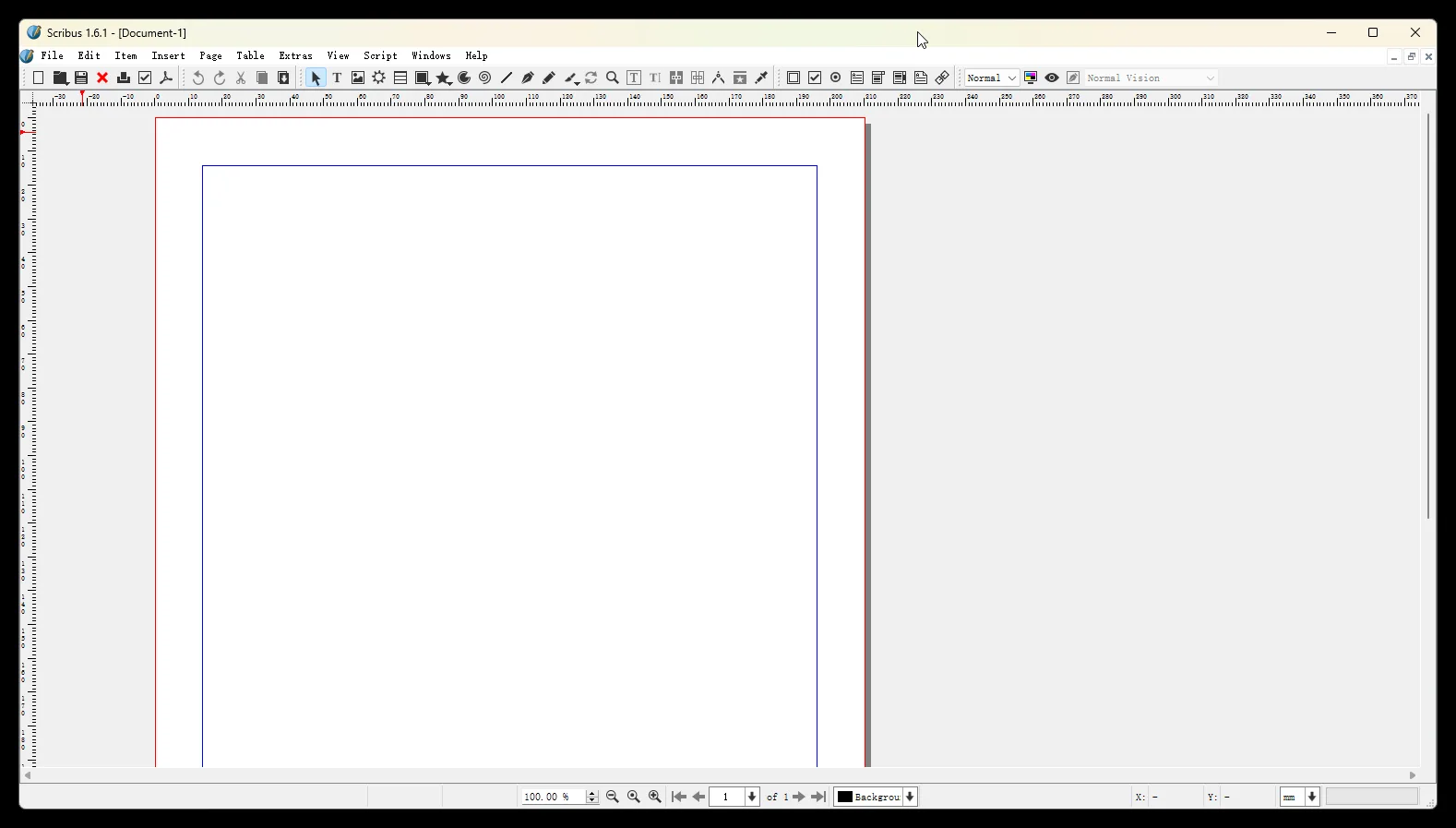
Any useful Scribus review has to lead with the interface, because that is what people bounce off. It looks like software from a different era, panels are dense, and text import needs manual attention. Look past it and you get color separations, ICC color management, spot colors, PDF/X output and a Python scripting interface for repetitive layout tasks, all under a free license from the Scribus project.
The 1.6 series added footnotes, endnotes, cross-references and text variables, which matters for report-style documents such as feasibility studies or heritage assessments. Scribus also imports IDML and ICML, so InDesign files and InCopy text come in cleanly. For a student assembling a print portfolio on a Linux machine with no budget, nothing else comes close.
📌 Did You Know?
Scribus predates the subscription model entirely. It was first released in June 2001 by German developer Franz Schmid to fill a gap in Linux page layout, and it is still maintained by volunteers under the GNU General Public License. The current stable release, version 1.6.6, arrived in April 2026, twenty-five years into the project (Scribus release notes, 2026).
3. QuarkXPress: For Architects Who Want to Own the License
QuarkXPress was the industry standard before InDesign took the market in the early 2000s, and it is still in active development. Quark sells it both ways: a prepaid annual subscription at $279 per year, or a perpetual license with maintenance and support at $637 upfront and $339 per year afterwards if you want continued upgrades, according to Quark’s own 2026 pricing.
The pitch for architects is ownership. You buy a version, you keep using it, and a lapsed payment does not lock your files. It imports InDesign documents, handles heavy print production well, and includes layout automation features that suit repeating page structures such as project sheets. It is the most expensive option here, and it makes sense mainly for offices producing printed documents on a regular schedule.
4. Canva: Fastest Route for Simple Layouts
Canva vs InDesign is not really a contest on typographic control, and pretending otherwise wastes everyone’s time. Canva has no baseline grid, limited kerning control and a template library that makes work look like everyone else’s. What it does have is speed, browser access, real-time collaboration and a free tier that students already know.
It works for internal presentations, quick client updates, social content and simple single-sheet boards. It is a poor fit for a printed portfolio where an image runs off the trim edge. If Canva is already your main tool and you are working out where its limits sit, our breakdown of Canva alternatives for architects covers the same ground from the opposite direction.
5. Figma: Best for Digital Portfolios and Shared Boards
Figma is screen-first software, so it has no bleed settings, no CMYK and no facing-page spreads. It is on this list because a large share of architectural output no longer gets printed. Digital portfolios sent as PDFs, interview presentations shown on a screen and collaborative concept boards all live comfortably in Figma, and two people can work in the same file at once.
Reusable components suit architectural layouts more than people expect. Build a title block, a north arrow and a scale bar once, then update every instance across a set of sheets in one move. Many studios use it upstream for early presentation board layouts and switch to a print tool only for the final file.
6. Adobe Express: Staying in the Adobe World Without Creative Cloud
If your office already runs Photoshop for render post-production, Adobe Express keeps you inside the same asset ecosystem at a much lower cost, with a usable free tier. It is template-driven and closer to Canva than to InDesign in ambition, so it will not carry a fifty-page document. For quick branded graphics that match the rest of your material, it does the job, and our Adobe Express review for architects goes into where it stalls.
The Six Tools Compared
The table below sets the six options against the criteria that decide most architectural projects.
| Tool | Price | Platform | Print output | Best for |
|---|---|---|---|---|
| Affinity | Free, AI features paid | Windows, Mac, iPad | CMYK, spot, PDF/X | Full InDesign replacement |
| Scribus | Free, open source | Windows, Mac, Linux | CMYK, separations, PDF/X | Print work on any budget |
| QuarkXPress | $279/yr or perpetual | Windows, Mac | Full prepress | Owning the license |
| Canva | Free tier, paid plans | Browser, mobile | Basic, RGB focused | Speed and templates |
| Figma | Free tier, paid editors | Browser, Windows, Mac | Screen only, no bleed | Digital portfolios, teams |
| Adobe Express | Free tier, paid premium | Browser, mobile | Basic, RGB focused | Adobe users on a budget |
Which InDesign Alternative Fits Your Work?

Sort the decision by output, not by feature count. If the file ends up on paper, whether that is a bound portfolio, a competition board or a printed report, you need CMYK, bleed and PDF/X, which narrows the field to Affinity, Scribus and QuarkXPress. If the file ends up on a screen, Figma and Canva are faster and the print features you are paying for elsewhere go unused.
Career stage matters too. Students and recent graduates gain nothing from a perpetual license and should start with Affinity, since it costs nothing and the skills transfer directly if an employer later puts InDesign in front of them. Small practices producing printed documents every month are the group for whom QuarkXPress ownership pencils out. Anyone still deciding which layout program to commit to can compare the wider set in our guide to architecture portfolio software.
💡 Pro Tip
Test any new layout tool by rebuilding one real A3 spread, then sending it to your usual print shop as a PDF/X file with 3 mm bleed and crop marks. Screen previews hide the failures that matter: shifted line weights on imported CAD linework, missing spot colors and images that drop to 72 dpi on export. One test print costs less than a reprinted portfolio the night before a deadline.
Whichever tool you land on, the vector and image work feeding into it stays a separate question. Diagrams still come from a drawing program, and our list of Illustrator alternatives for architects pairs with this one. Put the two together with a free layout tool and most of a Creative Cloud subscription becomes optional, a point our roundup of free tools for architectural design pushes further. For background on the category itself, the Wikipedia entry on Scribus lists the file formats each generation of desktop publishing software has supported.
Pricing reflects standard US rates published in mid 2026 and varies by region, tier and promotion. Check each vendor’s site before purchasing.
The interesting part of this shift is not that InDesign now has cheaper rivals. It is that page layout, once the most expensive software on an architect’s machine after the CAD seat, has quietly become the cheapest. Ten years from now the question a graduate asks will probably not be which layout program to buy, but whether the portfolio needs printing at all.
Architecture Students Hub
This guide is part of Portfolio, CV and Internships, stage 5 of our student roadmap from the first diagram to the first internship. Next stage: Opportunities, or browse every free tool and guide in the Architecture Students Hub.







Can You Become a Licensed Architect Through Experience Only?
Twenty-one US jurisdictions let candidates qualify for licensure with documented experience instead...
 Sinan Ozen6 Mins read
What It’s Like Working as an Architect: 5 Things Architecture School Doesn’t Teach You
Architecture school teaches design. Practice runs on construction documents, fee phases, consultant...
Furkan Sen7 Mins read

Architecture Competitions for Students: Are They Worth Your Time?
A practical look at whether architecture competitions are worth a student's time,...
Sinan Ozen6 Mins read

Do Architects Get Paid for Tender Stage Work? What the Fee Actually Covers
Tendering is part of an architect's basic services under both AIA and...
Sinan Ozen5 Mins read


Leave a comment