

Insights | How D5 Render Takes Over in the Global Architectural Visualization Market
D5 Render has emerged as a leading real-time rendering software in the architectural visualization market, outperforming traditional offline options and competing.
 Furkan Sen26 June 20227 Mins read748

Table of Contents Show
Real-time rendering has now become a trend in architectural visualization.
Compared with traditional offline rendering software, real-time renderer is a life-saver. Despite the boost in rendering efficiency, real-time render software is also striving for the quality of offline rendering.

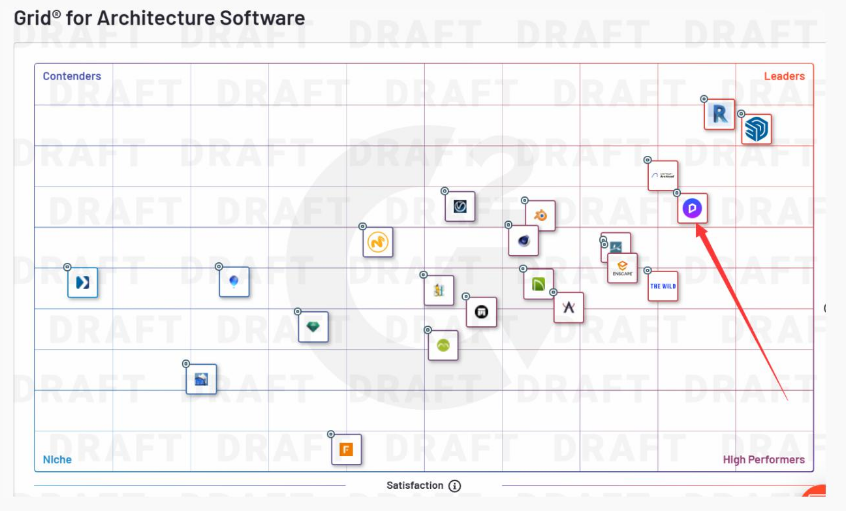
In 2021, D5 Render ranks first among architecture software with amazing performance in AEC(Architecture, Engineering, Construction) industry on G2, the world’s largest tech marketplace and software platform.
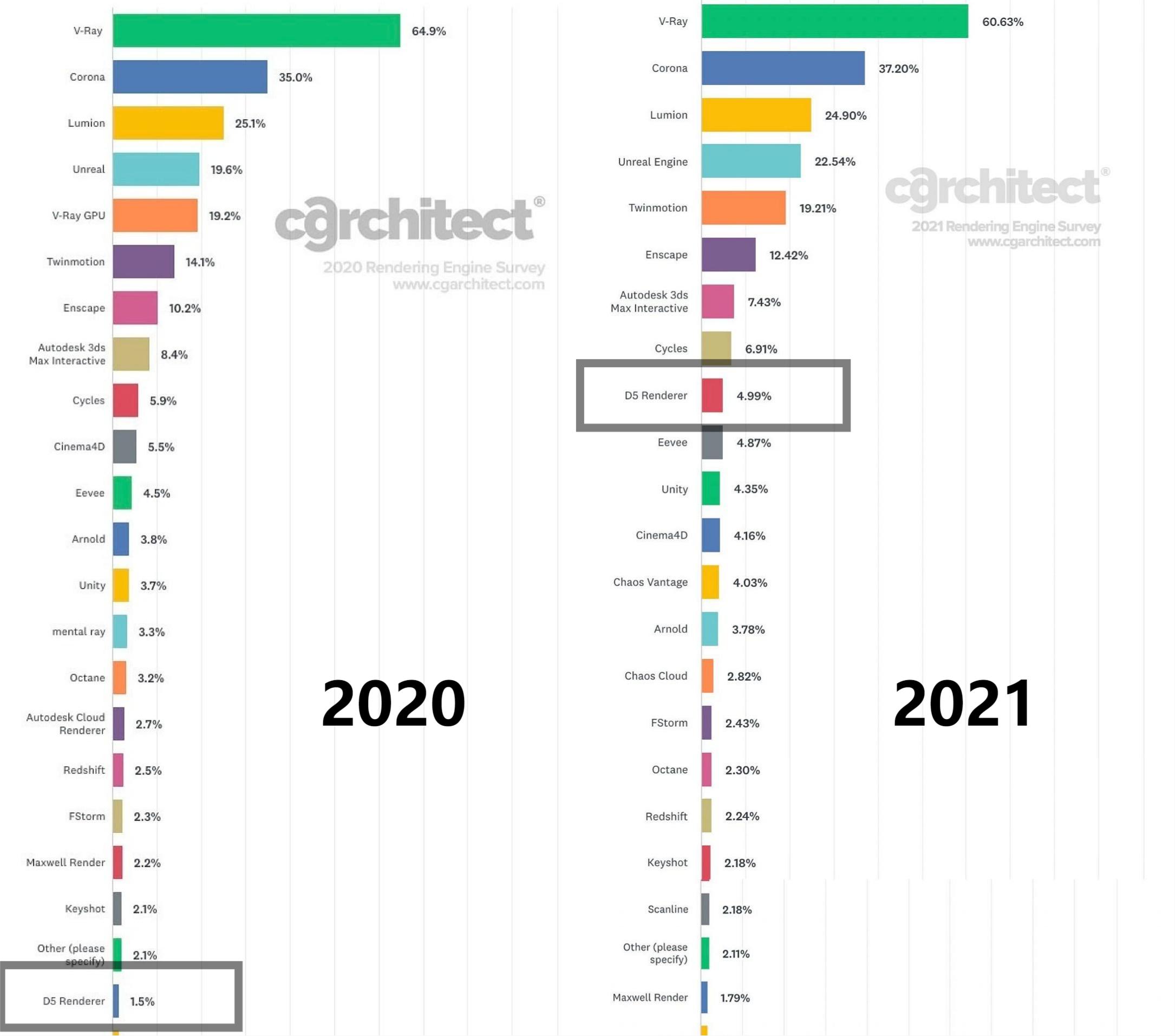
In 2021 Architectural Visualization Rendering Software Survey Results from CGArchitect, a professional archviz community and website, D5 ranks among the top 10, alongside the industry giants that have been in the game for over a decade including VRay, Corona, Lumion and Unreal Engine.
In this article, you can expect some insights into how D5 Render made its way to the top in the field of architectural visualization, and of course, some tips for better and more realistic rendering.
Today, we are looking at 3 types of rendering software.
- Traditional offline renderer: VRay, Chaos
As the veteran in the field, they have a long list of features but the software itself can seem a little clunky. Therefore, the learning curve is rather steep and it’s not always easy to get started with them. While these offline renderer attempt to find their way into real-time rendering, they can hardly get out of the old frame and break free into a completely new product. As a result, they can be lacking in effect and ease of use.

- Built-in real-time renderer: Enscape
This kind of renderer is labeled as “light-weight”. They are real-time, but sometimes fail to bring the best results since that’s their compromise to make.
In this sense, they are more likely to be used as a tool for real-time preview and VR presentation rather than rendering software to deliver output for clients.

- Standalone archviz renderer: Lumion, Twinmotion
Compared with the former two, this kind of renderer looks more suitable and has earned its place on the market:
However, they aso have their weaknesses, which are lack of RTX acceleration and photorealistic GI(global illumination). Due to these factors, visualization output can hardly live up to those produced by offline renderer.

That’s why D5 Render came into sight as an up and coming star in the industry.
It perfectly fits in your workflow with its astonishing output speed, user-friendly UI, and top-notch rendering effect. Real-time preview of any change in the scene precisely illustrates how your rendering would look, saving you all the guesswork while adjusting and waiting. You get the photorealistic renderings in a matter of seconds. On top of that, this software is free of charge.
If you’re looking for new software for rendering and visualization, look no further than D5 Render. See below, and you’ll find out exactly why designers, architects, and artists around the world are falling in love with this software.


1 – Integration with your own workflow
One renderer fits all

Importing models from modeling software to renderer has become commonplace these days. More and more rendering software are aware of the procedure and are trying to speed it up while optimizing the imported file size.

In this regard, D5 paid attention to all the mainstream modeling software and managed to tailor the plugins (D5 Converter) to meet different requirements. For example, in Rhino there is Layer command, in SketchUp there is Tags, and in Revit, there is family.

D5 took these differences into consideration and developed corresponding plugins for them accordingly. In a word, D5 is determined to present an easy-to-use product to designers of different workflows. Compared with other rendering software, D5’s got you covered when it comes to integration with your own workflows.

Another highlight of D5 Workflow is that they are aimed at saving your efforts throughout the process. Take material as an example: if you’re using D5 with modeling software that supports PBR materials, you can find your materials exactly as they were adjusted in your modeling software with parameters mapped precisely into D5 including details like emissive intensity.


Other than that, you can find other advantages of using D5. For example, Revit users will find it surprisingly easy to get started with D5 since D5 Converter for Revit has supported “Consistent Colors“, “Linked models”, and many other features designed for Revit only.
All of these give you a glimpse of how devoted D5 Team is to developing the rendering software that works best for designers and architects with different modeling software. They are so professional with each workflow that you might forget that D5 is a standalone product and mistake it for an extension developed by the modeling software themselves.

While D5 is doing an amazing job, it doesn’t like to keep its users waiting. With a regular update every 3 months that offers satisfactory new features and assets, fixes and improvements. Compared with its competitors, D5 comes back prepared every time a new version is released. D5 is here to wow the industry, not disappoint them with meaningless and pricey “updates”. For version 2.2, D5 reveals its new weather system of rain and snow that enables raining/snowing scenes(visible precipitation of raindrops/snowflakes in the air, snow-covered models, water streaks on exterior glasses, puddle) with just one click.

D5 Converters are going under development at an even faster pace. Last year, a lot of users were posting on D5 Forum asking for plugins to work with 3ds Max 2022, C4D, Rhino, Archicad25 and more. Less than 6 months later, all these have been supported now.
Earlier this year, integrations with SketchUp 2022 and Revit 2023 were supported within a month after their release. That is D5 Speed I’m talking about.
D5 Converter for Blender3.1 and 3ds Max 2022&2023 that supports VRay, Corona materials are in beta testing and will be released before long.


2 – Asset Library for Professionals
Your go-to library
D5 provides a cloud-based asset library that boasts thousands of models of furniture, vegetation, and characters that are ready to use. For animation, D5 offers a huge number of dynamic models and particles to bring your scene to life. Material library has an abundance of high-quality materials including PBR materials, saving you the effort to collect or make them yourself.
Designers from all walks of like can easily find what they need for all kinds of projects in this built-in library.

On YouTube, there are a ton of videos comparing the major rendering software, among which D5 has been a hot issue. You’ll find user’s discussions and comments on D5 under those videos, and most of them are proof that D5 really is doing a great job. For users that have used multiple rendering software, they can easily tell the difference and find out how D5 asset library lives up to their expectations:

D5 has established partnerships with some of the top manufacturers worldwide to continuously provide up-to-date and high-quality models for its users. Its library is growing, and more is about to come.

3- Designed for designers

Every product on the market has its own position and features. It’s inevitable that one has its strengths while weaknesses also exist. What’s important is the development team should be aware of where the product is lacking and how to fix the problems, and that’s how D5 Team stands out among its competitors. They design the software from a user’s point of view, and listen to the ideas and requests from their users.

Client Presentation
When it comes to developing a feature, D5 takes into consideration the user experience of not only the users, but also their clients.

For example, many may see VR(Virtual Reality) as a tool for designers to dive into their projects, but it’s not the case. This feature is more often than not used for their clients as an immersive experience to walk in the scenes. That being said, D5 supports not only real-time VR preview, but also panorama rendering to be further made into 360° panorama for client presentation.
Teamwork
Working as designers and architects, they are likely to team up. To make things easier and more efficient, D5 brought out Merge Projects to help studios/ companies divide the work among the team and manage their projects. In this way, they get to speed up teamwork with ease.
Multi-sync with modeling solutions
Twinmotion released its new features including Datasmith multi-sync support earlier this year, which has been long available in D5 Render when the software was first launched 2 years ago. It enables users to simultaneously synchronize files from multiple CAD/BIM tools into the same D5 scene using D5 Converters. In this way, you can do the modeling part in Archicad, and go in details with C4D while rendering using D5 at the same time. Multiple software work simultaneously as one in D5, offering you the fastest visualization workflow.

Customized local library

Apart from the vast cloud-based asset library, D5 makes asset management even easier with local asset library. Opening a D5 scene, whether it’s your own, or from others, you can use it like a “marketplace”. From models or textures, you can simply just click on it and “add to local”, making them part of your own collection and use them for any other project. See how to add models to local here.
What’s more, D5 users can set a NAS location to save their local assets, so that everyone in the team can add models/materials to the same place for each other to pick up and use later. This almost works like a cloud storage space, bringing convenience to the whole studio.

The option of Local Asset Library comes in handy for designers and architects since none of them can fully rely on just one piece of software to finish all of their projects.
It is often the case that they collect models or textures online and develop their own asset library. That said, the local asset library in D5 definitely saves their time and effort.


4- Free Software to Serve More in Need
At this critical period of time, we’ve witnessed a lot of changes take place in the field. As Chaos and Enscape merged and Unreal Engine 5 was launched, we’re looking at an increasingly competitive market.

While D5 Render is relatively young, it has shown its potential and capacity to the industry. It’s obvious that D5 is aimed at becoming the best creation tool for architectural visualization, and I’m confident that it will make it one day.

If you happen to own an RTX graphics card, then I strongly recommend D5 Render to you since it would be icing on the cake. If you don’t have one at the moment, D5 Render is still worth a try. With most of the features mentioned accessible, D5 is free to use. You don’t have to spend a cent to apply the rain/snow/fog/cloud/wind weather, scatter the plants, make animations, or render images with customized sizes up to an amazing 16K.

Learn more: https://www.d5render.com/
Free download: https://www.d5render.com/download






Futuro House Production Revived in Finland After Decades-Long Hiatus
A Facebook listing for abandoned moulds led to the first new Futuro...
 illustrarch Editoral Team3 Mins read

Building Your Dream Home in NSW: What You Should Know About Montgomery Homes
Montgomery Homes has been building across Sydney, Newcastle, the Hunter, Wollongong and...
illustrarch Editoral Team4 Mins read

Designing a Home Theater: Where Drapery Fits Into the Plan
In a media room the curtains are a performance layer, not decoration....
illustrarch Editoral Team3 Mins read

Oscar Niemeyer’s Cathedral of Brasília: The Hyperboloid Concrete Hymn
The Cathedral of Brasília reads as a single gesture, yet it stood...
Furkan Sen7 Mins read


Leave a comment