

Unlocking the Benefits of Architectural Design Software
Explore the top advantages of architectural design software, including 3D visualization, BIM integration, AI-powered design tools, and improved collaboration. Updated for 2025 with software comparisons and expert insights for architects.
 Elif Ayse Sen14 November 20256 Mins read456
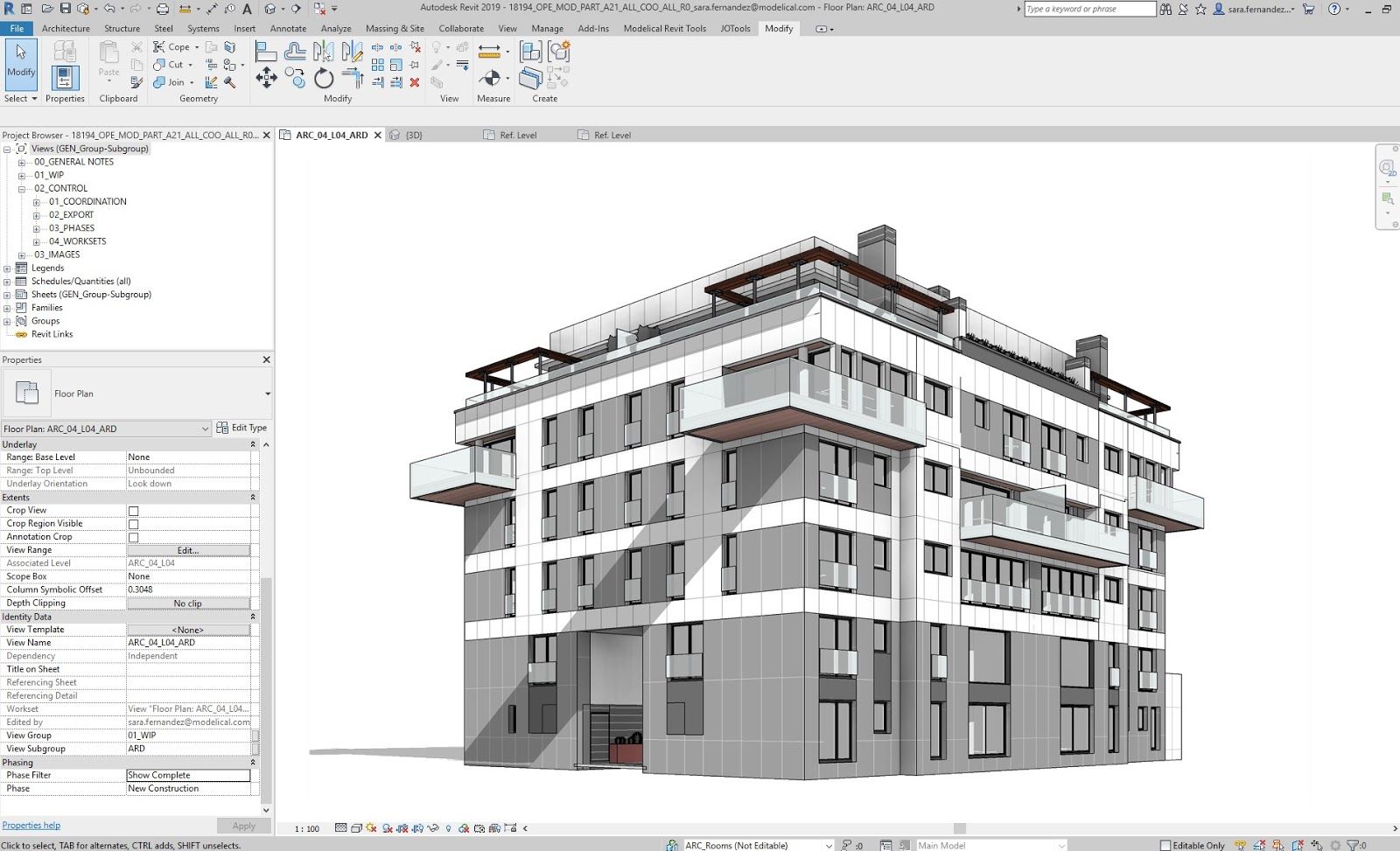
Table of Contents Show
The realm of architectural design is a bustling sphere that blends art with science, requiring an understanding of aesthetics, material science, structural integrity, spatial organization, and legal regulations. In this dynamic landscape, architectural design software emerges as a potent tool that architects can leverage to amplify their efficiency and creativity. Whether you are searching for the best architectural design software or trying to understand what is a design software in the context of architecture, this updated guide explores how professionals can maximize their potential by unlocking the benefits of software for architecture design in 2025 and beyond.
The benefits of architectural software are manifold, but arguably the best aspect lies in its ability to significantly enhance visualization and design communication. Using the best architectural design software, professionals can explore and experiment with innovative solutions, resulting in superior outcomes. Changes in one view are automatically reflected in all others, reducing the time and effort involved in manual updates. This capability allows for a more iterative design process, encouraging architects to test and refine their ideas continuously.
What Is Architectural Design Software?
Before diving into the advantages, it is important to clarify what is a design software in the architectural context. Architectural design software refers to any architectural software program that enables architects and designers to plan, draft, model, visualize, and manage building projects digitally. These range from 2D architectural drafting software like AutoCAD to comprehensive 3D architectural design software platforms such as Revit, ArchiCAD, and SketchUp. In essence, software architecture design software encompasses the entire spectrum of digital tools used throughout the building design lifecycle. As of 2025, the global construction and design software market continues to expand rapidly.
Technological Evolution and Architecture
The digital revolution has made a significant impact across all fields, and architecture is no exception. Traditional methods involving hand-drawn blueprints and physical models are rapidly being replaced by sophisticated software solutions. This shift allows architects to conceive, visualize, manipulate, and share complex designs more efficiently than ever before. Forward-thinking software development companies like Redwerk help design and construction firms build custom tools that simplify workflows, enhance visualization and improve collaboration.
In recent years, emerging technologies such as artificial intelligence (AI) and machine learning have further transformed the architectural design in software landscape. AI-powered features now assist with generative design, automated clash detection, and energy optimization, making modern architectural software programs smarter than ever. Leading firms are already using AI-integrated building design softwares to reduce rendering times significantly and generate multiple design iterations in a fraction of the time previously required.
Discuss the Advantages of Architectural and Design Software
When professionals and students discuss the advantages of architectural and design software, several key benefits consistently emerge. Here is an overview of the most significant advantages:
Precision and Accuracy
Architectural designs software enables architects to produce highly precise measurements and construction drawings. Digital tools minimize human error and ensure consistency across all project documents, resulting in fewer costly mistakes during construction.
Faster Design Iterations
One of the greatest strengths of modern software for architecture design is the speed at which designers can test and refine ideas. Changes made in one view automatically propagate throughout the entire model, eliminating tedious manual updates and encouraging creative experimentation.
Cost Savings and Risk Reduction
By identifying potential design conflicts early in the digital modeling phase, architectural design software helps reduce expensive change orders during construction. Virtual prototyping allows teams to foresee problems before they manifest on-site.
Sustainability Analysis
Many modern architectural software programs offer integrated sustainability analysis tools that evaluate energy consumption, carbon footprint, and material efficiency. With growing demand for green buildings and LEED certification, these features have become essential components of the best architecture software design suites today.
Integrative Design Process
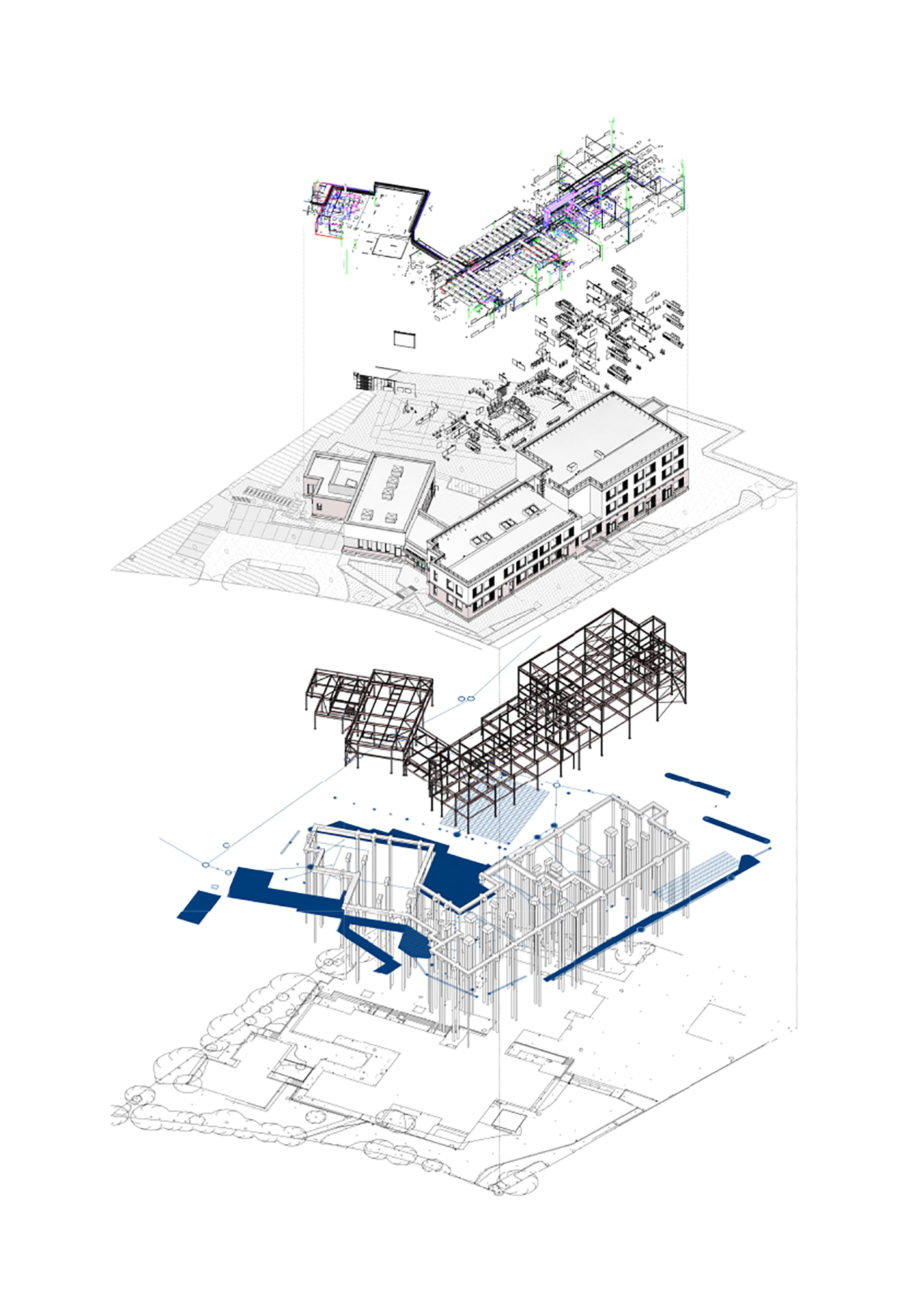
Architectural design software encourages a more integrative design process. Traditional methods often require separate drawings for different building components, leading to coordination issues. With software, all aspects of a building design—from structural elements to HVAC systems—can be integrated into one model, resulting in better coordination, fewer errors, and less rework. For architects exploring different architectural software options, our guide to architectural design softwares and their features compares the integrative capabilities of leading platforms to help you select the best architectural drafting software for your projects.
Enhanced 3D Visualization with Architectural Design Software
3D architectural design software enables architects to represent their designs in three dimensions, providing a comprehensive understanding of spatial relationships. Clients can virtually walk through the building before construction begins, providing an opportunity for feedback and early-stage changes. Moreover, many applications can simulate lighting, textures, and materials, offering an impressively realistic preview of the final product.
The ability to create virtual walkthroughs is a game-changer. These immersive experiences allow clients and stakeholders to virtually explore the designed space before any physical construction begins, facilitating more meaningful feedback and reducing the likelihood of costly changes during construction.
Architectural software allows designers to build and visualize in three dimensions rather than the traditional two, providing better spatial awareness and interactivity. For students developing their visualization skills, our guide on the best architectural software for students in 2025 covers accessible tools with powerful 3D capabilities.
Many software for architecture design tools can simulate materials, lighting, and textures, creating highly realistic renderings. This functionality helps architects and clients visualize the final product and is invaluable when presenting proposals for planning permissions or investors. Explore our roundup of top software tools for architectural presentations.

BIM (Building Information Modeling) — The Future of Architectural Software
One of the most influential developments in architectural software is Building Information Modeling (BIM). BIM is not merely a tool but a process that enables the creation and management of digital representations of a building’s physical and functional characteristics. This approach allows architects to predict performance, understand behavior, and make informed design decisions. In 2025, BIM adoption continues to accelerate, with governments worldwide mandating BIM workflows for public projects.
BIM-enabled building design softwares like Autodesk Revit and ArchiCAD go beyond simple 3D modeling by embedding rich data—including material specifications, cost estimates, and construction timelines—directly into the model. This data-driven approach transforms collaboration through real-time clash detection and lifecycle analysis. For a deeper dive, read our article on the best BIM software and our guide on becoming a BIM expert.
Improving Efficiency and Productivity with Architectural Design Software
Architectural design software helps improve efficiency by automating repetitive tasks, reducing human error, and saving time on design changes. The software can automatically update all relevant views and drawings when changes are made—a feat that would be incredibly time-consuming manually. This leads to a faster design process, freeing up architects to focus on strategic and creative work.
Architectural design software facilitates improved communication and collaboration among project teams and stakeholders. Cloud-based solutions allow multiple users to access and edit a project simultaneously from anywhere, and the ability to annotate PDF versions of design drafts streamlines the review process.
Choosing the Best Architectural Drafting Software for Your Needs
With so many options available, selecting the best architectural drafting software or best architecture software design platform can feel overwhelming. Here are key considerations when evaluating an architectural software program:
Project complexity: For large-scale projects, a robust BIM platform like Revit or ArchiCAD is typically the best architectural design software choice. For smaller projects, SketchUp or Vectorworks may be more appropriate. Our Revit vs Archicad comparison and Archicad vs SketchUp guide can help you decide.
2D vs 3D capabilities: If your workflow focuses on technical drawings, dedicated architectural drafting software like AutoCAD remains indispensable. If visualization is a priority, investing in 3D architectural design software with rendering capabilities will deliver greater value.
Collaboration and learning curve: Look for architectural software programs that support real-time multi-user editing and cloud-based file sharing. Our Architectural Design Software 101: A Beginner’s Guide is an excellent starting point for those new to the field.
The Role of AI and Emerging Technologies in Architectural Software
As we move into 2026, artificial intelligence is reshaping how architectural design software functions. AI-driven tools now assist with generative design—automatically producing optimized floor plans based on user-defined parameters. Machine learning algorithms recommend energy-efficient strategies, while real-time simulation allows instant environmental testing.
Additionally, virtual reality (VR) and augmented reality (AR) integration within modern architectural software programs is enabling immersive client experiences. Architects can present full-scale virtual walkthroughs that allow stakeholders to experience spaces before construction begins. This convergence of AI, VR, and BIM represents the next frontier of architectural design in software. The American Institute of Architects (AIA) reports that firms embracing these technologies are seeing measurable improvements in design quality and client satisfaction.
Conclusion: Maximizing Potential with Architectural Design Software
Architectural design software has dramatically transformed the way architects work, providing tools and capabilities that augment their creativity, efficiency, and effectiveness. By unlocking the benefits of this software, professionals can maximize their potential and deliver high-quality, sustainable, and innovative designs that respond to the needs of the modern world. The key to success lies in understanding and harnessing these tools’ full capabilities, continually learning, and adapting to the ever-evolving technological landscape.
Whether you are evaluating the best architectural drafting software for technical documentation, exploring 3D architectural design software for visualization, or implementing a full BIM workflow, the right architectural software program will empower you to design smarter and build more sustainably. Stay updated by exploring our guide to architectural design softwares and features.







Notion Alternatives for Architects: 7 Tools That Fit Studio Work
Notion works until a studio needs fee tracking, phase budgets and timesheets....
 Furkan Sen7 Mins read

Why Every Practice Ends Up With Five Versions of the Same Revit Family
Let’s learn why Revit family libraries accumulate duplicates, break schedules and slow...
 illustrarch Editoral Team5 Mins read

Visualizing Renovation Projects From Photographs: A Workflow for Existing-Building Work
Photo-based visualization turns a photograph of a building that already exists into...
illustrarch Editoral Team7 Mins read

Best Free CAD Blocks and Resources for Architects
A working guide to free CAD blocks for architects, covering ARCAT, CAD-Blocks.net,...
Furkan Sen7 Mins read


Leave a comment