

11 Best Architecture Tools of 2026: Programs, AI, and iPad Apps
A comprehensive guide to the most influential architecture tools and AI platforms shaping design workflows in 2026. From cloud-based drafting and real-time rendering to intelligent automation and mobile design apps, this article explores how architects are working faster, collaborating smarter, and designing more responsive, future-ready environments.
 Bahattin Duran21 December 202513 Mins read546

Table of Contents Show
The best architecture tools of 2026 span three categories: cloud-based design programs like Rayon.Design and D5 Render, AI-powered platforms such as MidJourney, ChatGPT, and Archfine AI, and portable iPad apps including Procreate, Feather 3D, and Morpholio Trace. Together, these 11 tools cover every stage of the architectural workflow, from early concept sketching to client-ready visualization.
The architecture profession is undergoing one of the biggest technological shifts in its history. Traditional workflows built around manual drafting, slow rendering, and disconnected file systems are being replaced by real-time collaboration, cloud-based creativity, and intelligent automation. In 2026, architects are no longer limited by their physical workstations. Design happens simultaneously in the studio, onsite, and in transit. Tools are becoming faster, smarter, and more aligned with how architects think: visually, spatially, and experimentally.
Whether you are exploring early concepts, presenting polished visuals, coordinating with consultants, or engaging with community stakeholders, the current wave of digital platforms is reducing friction at every step. According to a 2024-2025 survey by Architizer and Chaos of 1,227 architecture professionals, 46% already use AI tools in their visual workflow, with 74% planning to increase usage within the next 12 months. The tools listed below represent the practical forefront of this shift across programs, AI platforms, and mobile apps.

1. Top Programs
These three programs lead the industry in 2026 with distinct strengths in cloud drafting, real-time rendering, and parametric landscape design:
Rayon.Design
Rayon.Design remains one of the most powerful cloud-based drafting and planning tools for architects and urban designers. The 2026 release improves spatial data visualization, real-time co-editing, and zoning analysis, all directly in the browser. Its lightning-fast layout tools and live collaboration features make it ideal for feasibility studies, site planning, and interior space design without the need for traditional CAD software. For firms looking to reduce their dependency on local hardware, Rayon offers a practical entry point into cloud-based SaaS architecture workflows.

D5 Render continues to push real-time visualization forward with unmatched rendering speed and cinematic material realism. The newest version introduces AI-assisted lighting suggestions, cloud rendering, and smoother VR export, enabling stunning visuals earlier in the design process. Perfect for client communication, D5 turns conceptual ideas into immersive experiences in seconds.

💡 Pro Tip
When choosing between cloud-based and desktop rendering tools, consider your internet reliability first. D5 Render requires a DirectX 12 GPU locally, while Rayon.Design works entirely in the browser. If your team splits time between the office and remote locations, pairing a cloud tool for drafting with a local renderer for final visuals gives you the best of both worlds.
Land Kit
Land Kit, the parametric landscape design engine built for Rhino workflows, now features deeper ecological intelligence. Its 2026 update introduces automated grading suggestions, water-flow simulation, and native plant suitability mapping. For landscape architects aiming to design resilient outdoor environments, Land Kit blends geometry with environmental responsibility. Professionals working on ecological site design can pair it with GIS mapping tools for more data-rich workflows.

| Feature | Rayon.Design | D5 Render | Land Kit |
|---|---|---|---|
| Primary Use | Cloud-based drafting & space planning | Real-time 3D rendering & visualization | Parametric landscape design |
| Platform | Web browser + Desktop (Win & Mac) | Windows only (DirectX 12 GPU required) | Rhino + Grasshopper plugin (Win & Mac) |
| Free Plan | ✅ Yes (limited features) | ✅ Yes: Community (non-commercial) | ✅ Yes: Freemium (core features free) |
| Starting Price | $21/mo (Pro) | $38/mo or $360/yr (Pro) | Free core / Pro Key for advanced |
| Team / Enterprise Plan | $38/mo per editor (Team) | $75/mo per seat (Teams, min 2 seats) | Floating License available |
| Real-Time Collaboration | ✅ Live co-editing & link sharing | ✅ Cloud rendering & team sync | ❌ Plugin-based (no live co-edit) |
| AI Features (2026) | Spatial data visualization, zoning analysis | AI lighting suggestions, Atmosphere Match, AI Enhancer | Automated grading, water-flow simulation, plant suitability mapping |
| File Format Support | DWG, DXF, PDF, Images | SketchUp, Revit, Rhino, 3ds Max, Blender, C4D, ArchiCAD | Rhino native; exports to AutoCAD, Revit, Lumion, Enscape |
| Best For | Feasibility studies, site planning, interior layouts | Client presentations, immersive walkthroughs, VR | Landscape architecture, ecological site design |
| Student/Education Offer | ✅ Free for students (.edu email) | ✅ Free Education license | Available via ASLA membership |
2. Top AI Tools
Artificial intelligence is now a core part of every architectural workflow. These platforms accelerate ideation, iteration, and visualization at a level that was not possible even two years ago. For a deeper look at AI adoption trends, the breakdown of AI tools across architectural design stages covers how firms are combining these platforms to cut project timelines.
MidJourney remains a leading image-to-concept AI for fast visual exploration. Higher resolution outputs, improved architectural logic, and editable variations make it perfect for mood boards, facade ideas, and design storytelling. It helps uncover bold ideas early, long before modeling begins.

ChatGPT now integrates deeper design intelligence with parametric scripting support, BIM automation suggestions, zoning summaries, specification drafting, and multi-format research sourcing. Whether writing narratives, generating diagrams, or coding Grasshopper definitions, it adapts directly to project needs.

🔢 Quick Numbers
- 46% of architecture professionals already use AI tools in their workflows (Architizer and Chaos Survey, 2024-2025)
- AI-assisted rendering reduces image generation time from 2-4 hours to under 10 minutes for concept-phase outputs (Autodesk State of Design and Make Report, 2024)
- 76% of AEC organizations plan to increase AI investment within the next three years (Autodesk, 2024)
- The generative AI in architecture market is projected to reach $5.85 billion by 2029 at 41.1% annual growth (The Business Research Company, 2025)
This open-source AI rendering model continues to evolve for professionals requiring maximum control and style consistency. Architectural training datasets and multi-image generation workflows help designers produce cohesive graphics across entire presentations, from conceptual art to polished deliverables.

Aino World
Aino World uses AI to automate functional space planning. The 2026 version delivers faster unit mix optimization, more accurate circulation mapping, and zoning compliance scoring. It drastically reduces early-stage guesswork, allowing projects to advance with confidence and data-backed decision-making.

Archfine AI
Archfine AI is emerging as one of the most advanced AI rendering solutions tailored specifically for architectural use. In 2026, its cloud visualization engine transforms sketches, CAD exports, or basic massing models into highly detailed interior and exterior renders within seconds. With style presets, camera intelligence, and automated iteration suggestions, Archfine AI ensures that design teams deliver consistent, client-ready visuals at any stage. It eliminates heavy hardware requirements and expensive rendering labor, making rapid visualization accessible to studios of all sizes.

| Feature | MidJourney | ChatGPT | Stable Diffusion | Aino World | Archfine AI |
|---|---|---|---|---|---|
| Primary Use | AI image generation & concept art | Text AI: scripting, research, automation | Open-source AI image generation | AI space planning & GIS analysis | AI architectural rendering |
| AI Category | Image-to-Concept | Multimodal LLM | Image Generation (Open-Source) | Spatial AI & Data | Cloud Rendering AI |
| Platform | Web (Discord & Web App) | Web, Mobile, API | Local install (Win/Mac/Linux) or Cloud | Web-based (Browser) | Web-based (Cloud) |
| Free Plan | ❌ No free trial | ✅ Yes (Free tier) | ✅ Fully free (open-source) | Trial only (no free plan) | Free trial / credits |
| Paid Plan Starts | ~$10/mo (Basic) | $20/mo (Plus) | Free (hardware costs apply) | $60/mo (Pro, as of October 2026) | Credit-based / Subscription |
| GPU / Hardware Required | ❌ Cloud-based | ❌ Cloud-based | ✅ Dedicated GPU recommended | ❌ Cloud-based | ❌ Cloud-based |
| Key 2026 Features | High-res outputs, architectural logic, editable variations, video | Parametric scripting, BIM automation, Grasshopper coding | Custom training datasets, multi-image workflows, style consistency | Unit mix optimization, circulation mapping, zoning compliance | Sketch-to-render, style presets, camera intelligence, auto-iteration |
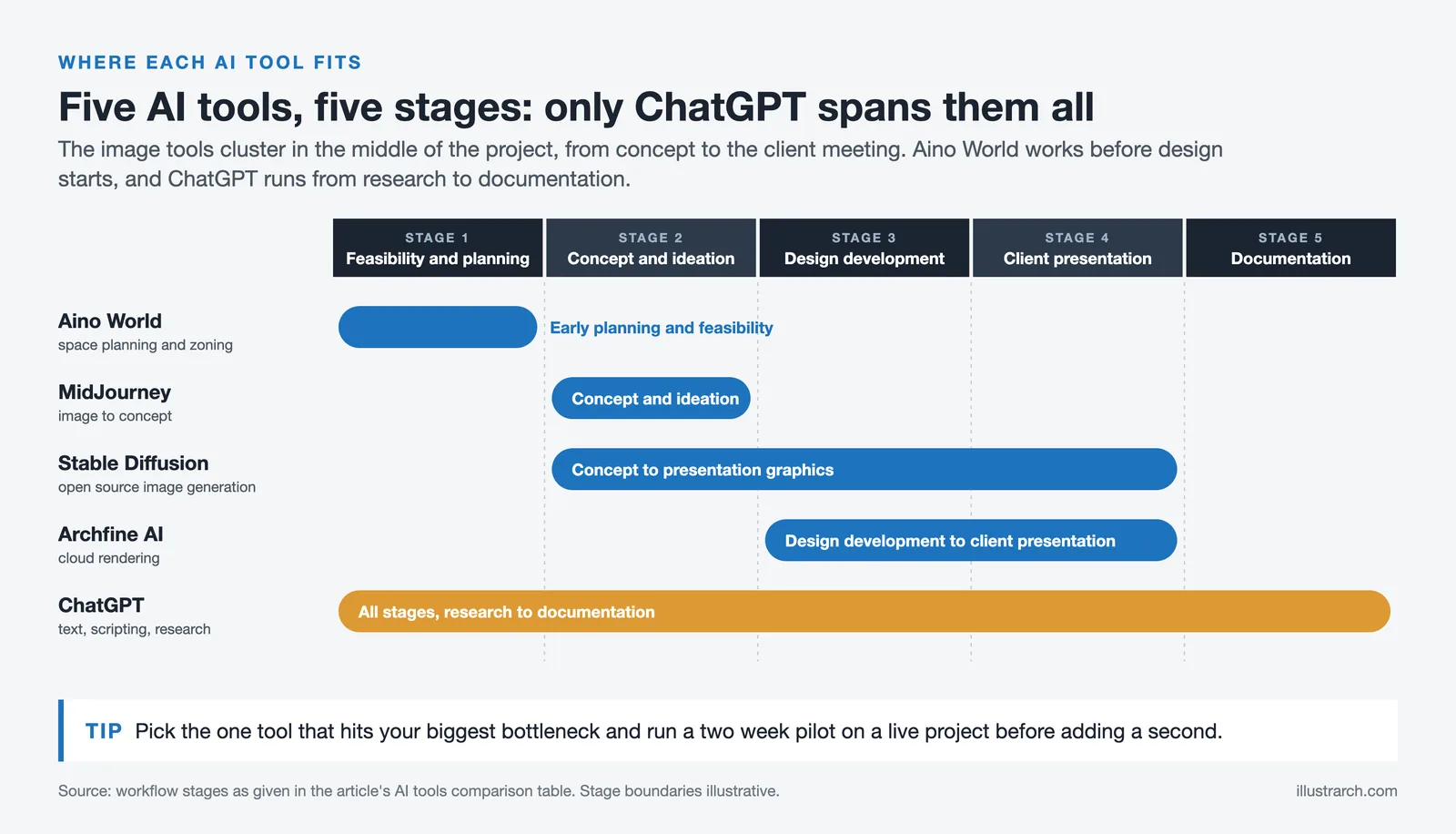
| Architectural Workflow Stage | Concept & ideation | All stages: research to documentation | Concept to presentation graphics | Early-stage planning & feasibility | Design development to client presentation |
| Customization Level | Prompt-based control | Highly flexible (text & code) | Maximum (open-source, full control) | Data-driven parameters | Style presets + automatic suggestions |
| Best For | Mood boards, facade concepts, storytelling | Research, spec drafting, scripting, diagrams | Cohesive presentation graphics, full creative control | Space planning, data-backed decisions, urban analysis | Rapid client-ready renders from sketches or CAD |
How to Choose the Right AI Architecture Tool
With five major AI platforms now available to architects, picking the right one depends on where you spend the most time in the project cycle. If your bottleneck is concept exploration and client buy-in at the schematic stage, MidJourney or Archfine AI will return the most value per dollar. If your team spends hours writing specifications, code compliance summaries, or Grasshopper scripts, ChatGPT fits naturally into that documentation layer. Stable Diffusion makes sense for studios that need brand-consistent visuals across large presentation sets and have the technical capacity to run local models. Aino World serves firms where early-stage space planning and zoning analysis consume the most project hours.
The practical recommendation from experienced firms is to avoid trying all tools at once. Pick one that addresses your biggest bottleneck, run a two-week pilot on a live project, and measure the actual time saved before expanding your toolkit. A test file in demo mode does not reveal the same integration friction that a real deadline does.
🎓 Expert Insight
The firms winning on project delivery in 2026 are not necessarily using the most expensive tools. They are using the fastest tools for each phase of work.
This observation holds across firm sizes. Small studios often outperform larger competitors by matching the right tool to the right workflow stage, rather than defaulting to a single enterprise platform for every task.
3. Top iPad Apps
For architects working across office, jobsite, and travel, these mobile tools deliver true design freedom. The iPad has moved from a supplementary sketch pad to a primary design device, especially during site visits, client meetings, and early concept sessions. For more options, the guide to iPad apps for landscape architecture covers additional tools focused on outdoor design workflows.
Procreate remains the most expressive digital sketching tool for architects. The 2026 update introduces real-time perspective guides, vector-precision export, and AI-assisted brush tools, allowing hand-drawn ideas to convert into digital workflows without losing artistic character.

Feather 3D
Feather 3D turns the iPad into a portable modeling hub. With improved AR anchoring, massing-to-site scaling, and cloud syncing, architects can instantly view forms in their real-world context. It is ideal for early volumetric studies and interactive discussions with clients on-site.

💡 Pro Tip
Combine Procreate sketches with Feather 3D on site visits for maximum client impact. Sketch a concept in Procreate during the meeting, then switch to Feather 3D to show the massing in AR overlaid on the actual site. This two-app workflow turns a 30-minute client discussion into a productive design session with tangible visual output.
Morpholio Trace
Morpholio Trace continues to be a cornerstone app for quick design iteration. Automated plan recognition, smart layer enhancements, and detail templates let architects sketch faster while keeping information organized for downstream modeling. Trace blends the immediacy of paper with the intelligence of digital drafting.

| Feature | Procreate | Feather 3D | Morpholio Trace |
|---|---|---|---|
| Primary Use | Digital sketching & illustration | 3D modeling & AR visualization | Design sketching, markup & CAD overlay |
| Pricing Model | One-time purchase: ~$12.99 | One-time purchase: $14.99 (as of October 2026) | Freemium: Free / Plus / Pro subscription |
| Free Version | ❌ Paid only (one-time) | ❌ One-time purchase | ✅ Up to 5 projects, basic tools |
| Pro Price | ~$12.99 (lifetime) | $14.99 (one-time) | $24.99 (Pro, as of October 2026) |
| Apple Pencil Support | ✅ Full (Pencil 1, 2 & Pro) | ✅ Yes | ✅ Full (optimized for Pencil) |
| AR Capability | ❌ No | ✅ AR anchoring & site scaling | ✅ RoomPlan / LiDAR scan integration |
| Scale Drawing | ❌ Manual only | ✅ Massing-to-site scaling | ✅ Built-in scale tools & rulers |
| PDF / CAD Import | Images only (PNG, JPG, PSD) | 3D model import | ✅ Full PDF viewer & DXF export |
| Key 2026 Features | Perspective guides, vector-precision export, AI-assisted brushes | Improved AR anchoring, cloud syncing, real-world context viewing | Automated plan recognition, smart layers, detail templates |
| CAD Export | ❌ Image formats only | ✅ Cloud sync to desktop | ✅ DXF export to AutoCAD, Rhino, Revit, SketchUp |
| Best For | Hand-drawn concept art, illustrations, renderings | On-site volumetric studies, client AR demos | Quick iterations, PDF markups, scaled technical sketching |
| Tool | Category | Platform | Starting Price | Free Option | Best For |
|---|---|---|---|---|---|
| Rayon.Design | Program | Web / Desktop | $21/mo | ✅ | Cloud drafting & space planning |
| D5 Render | Program | Windows | $38/mo | ✅ | Real-time 3D rendering |
| Land Kit | Program | Rhino Plugin (Win/Mac) | Free / Pro Key | ✅ | Parametric landscape design |
| MidJourney | AI Tool | Web | ~$10/mo | ❌ | Concept art & visual exploration |
| ChatGPT | AI Tool | Web / Mobile / API | $20/mo (Plus) | ✅ | Scripting, research, BIM automation |
| Stable Diffusion | AI Tool | Local / Cloud | Free (open-source) | ✅ | Cohesive presentation graphics |
| Aino World | AI Tool | Web | $60/mo | Trial | AI space planning & zoning analysis |
| Archfine AI | AI Tool | Web (Cloud) | Credit / Subscription | Trial | Sketch-to-render in seconds |
| Procreate | iPad App | iPadOS | ~$12.99 (one-time) | ❌ | Digital illustration & sketching |
| Feather 3D | iPad App | iPadOS | $14.99 (one-time) | ❌ | AR modeling & on-site client demos |
| Morpholio Trace | iPad App | iPadOS | Free / $24.99 (Pro) | ✅ | Quick sketching, markup & CAD overlay |
What Are the Best Free Architecture Tools in 2026?
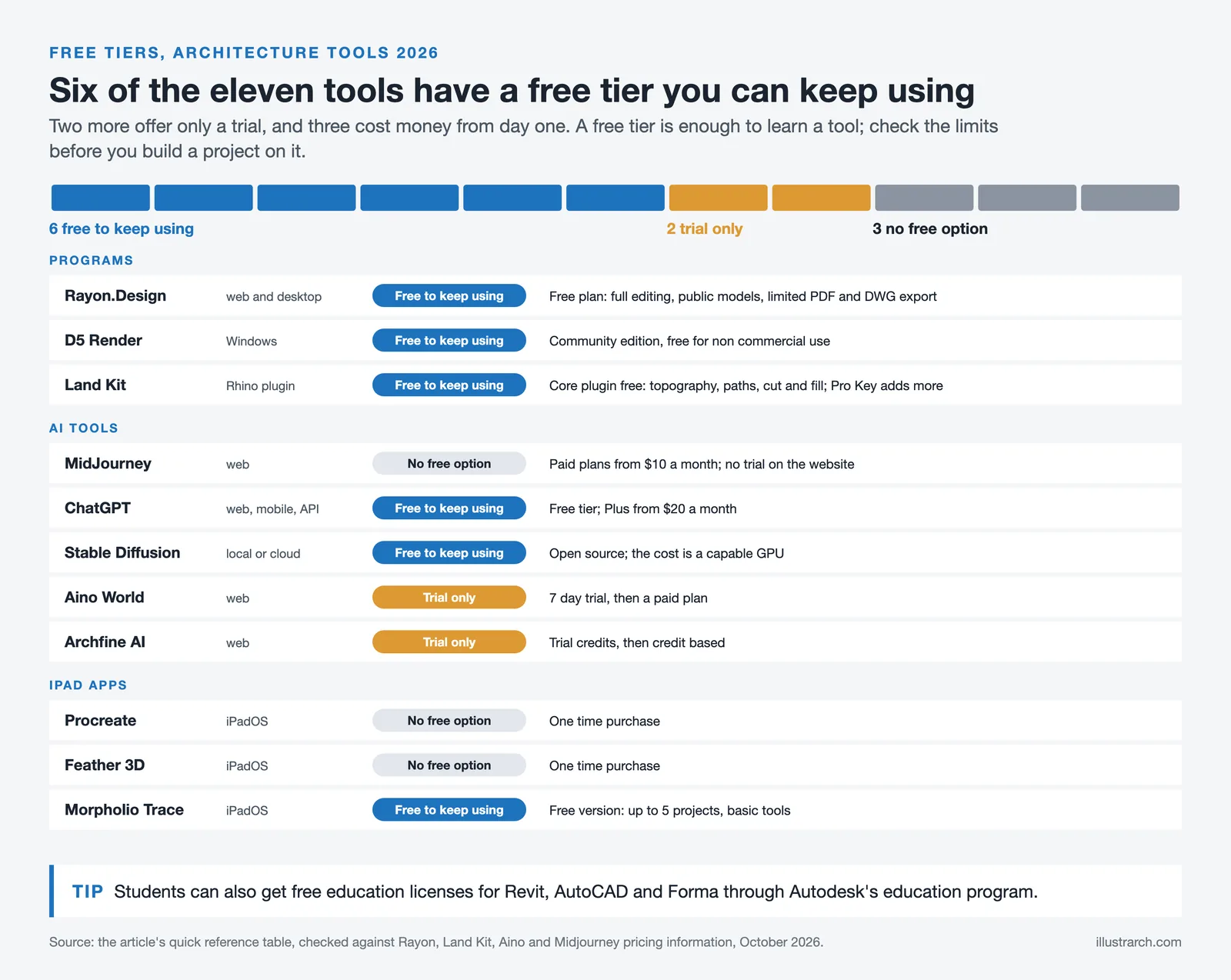
Budget constraints affect solo practitioners, students, and small firms alike. Several of the best architecture tools in 2026 offer free tiers that are genuinely functional, not just limited demos. Rayon.Design provides a free plan with core drafting and space planning features. D5 Render’s Community edition is free for non-commercial use, making it accessible for students and personal projects. Land Kit offers freemium access to its core landscape tools through the Rhino ecosystem. Stable Diffusion is entirely open-source, requiring only a capable GPU. Morpholio Trace includes a free version supporting up to five projects with basic tools.
For architecture students, Autodesk’s education program provides free licenses for Revit, AutoCAD, and Forma. The American Society of Landscape Architects (ASLA) also provides student access to several design platforms. These free options mean that cost no longer blocks entry into professional-grade design workflows.
📌 Did You Know?
According to the 2024 NBS National BIM Report, 73% of UK architecture practices now use BIM on at least some projects, up from 39% in 2011. Cloud-based BIM tools like Snaptrude are accelerating this trend further by offering free plans that include full BIM modeling and AI floor plan generation.
Design in 2026: Smarter, Faster, More Intuitive
Architecture in 2026 is defined by digital-forward thinking and streamlined performance. Designers now have access to tools that automate the repetitive parts of the profession, freeing them to focus on creative vision and human-centered problem-solving. Cloud platforms ensure that coordination barriers fade away, AI systems help generate informed solutions rather than assumptions, and portable hardware enables design work from anywhere.
As sustainability targets rise and urban environments grow more complex, these technologies give architects the power to model real consequences, communicate visually persuasive ideas, and adapt their work instantly to feedback and new information. The broader shift toward architectural technology and data-driven design is not just a trend; it is the operational reality for firms that want to stay competitive. For a wider view of the essential architecture tools beyond software, including physical equipment and workspace setup, architects can explore the full toolkit breakdown. The firms that adopt these tools thoughtfully are not just keeping up; they are setting the pace for what comes next in the built environment.
✅ Key Takeaways
- Cloud-based programs like Rayon.Design remove hardware dependency and enable real-time collaboration across distributed teams.
- AI rendering tools (Archfine AI, MidJourney, Stable Diffusion) reduce concept visualization time from hours to minutes, with 46% of architects already using AI in daily workflows.
- iPad apps (Procreate, Feather 3D, Morpholio Trace) have evolved from sketch tools into full design platforms with AR, CAD export, and cloud sync capabilities.
- The best architecture tools in 2026 are chosen by workflow stage, not by brand loyalty. Matching the right tool to the right phase of a project delivers the biggest time savings.
- Free tiers and student licenses from multiple platforms mean cost is no longer a barrier to accessing professional-grade architecture software.
Frequently Asked Questions
What is the best architecture software for beginners in 2026?
For beginners, Rayon.Design offers the lowest barrier to entry because it runs entirely in the browser with no installation or hardware requirements. Morpholio Trace on iPad is also beginner-friendly for freehand design work. Students can access free Autodesk education licenses for Revit and AutoCAD, which remain industry standards for BIM and technical drafting.
Which AI tool is best for architectural rendering?
It depends on the project phase. For fast concept visuals and client mood boards, MidJourney is the most widely used option starting at $10 per month. For architecture-specific rendering from sketches or CAD exports, Archfine AI provides the most targeted workflow. Stable Diffusion offers maximum control for studios with the technical capacity to run local models.
Can architects use iPads for professional design work?
Yes. In 2026, iPad apps like Procreate, Feather 3D, and Morpholio Trace support professional workflows including scaled drawings, CAD overlay, AR visualization, and DXF export. Many architects use iPads as their primary device for site visits, client meetings, and early concept development.
How much do the best architecture tools cost in 2026?
Pricing ranges widely. Procreate costs a one-time $12.99, Rayon.Design Pro starts at $21 per month, and D5 Render Pro runs $38 per month. AI tools like MidJourney start at $10 per month, while Stable Diffusion is entirely free (open-source). Several platforms including Rayon.Design, D5 Render, Land Kit, and Morpholio Trace offer functional free plans.
Are AI architecture tools replacing traditional rendering software?
AI tools are replacing the concept and iteration phase of rendering, where most visualization hours are spent. For final construction documentation and high-resolution marketing deliverables, physics-based engines like V-Ray, Lumion, and Enscape still produce more precise outputs. The most productive firms in 2026 use a hybrid approach: AI for early stages and traditional renderers for final hero images. For more on how this shift is playing out, the AI render workflow guide covers the practical pipeline in detail.
Prices and feature details mentioned in this article are based on publicly available information as of early 2026 and may vary by region, plan, or update cycle. Always check the official website of each tool for the most current pricing.


2 Comments





Notion Alternatives for Architects: 7 Tools That Fit Studio Work
Notion works until a studio needs fee tracking, phase budgets and timesheets....
 Furkan Sen7 Mins read

Why Every Practice Ends Up With Five Versions of the Same Revit Family
Let’s learn why Revit family libraries accumulate duplicates, break schedules and slow...
 illustrarch Editoral Team5 Mins read

Visualizing Renovation Projects From Photographs: A Workflow for Existing-Building Work
Photo-based visualization turns a photograph of a building that already exists into...
illustrarch Editoral Team7 Mins read

Best Free CAD Blocks and Resources for Architects
A working guide to free CAD blocks for architects, covering ARCAT, CAD-Blocks.net,...
Furkan Sen7 Mins read


I love how the article highlights Rayon.Design! It sounds like such a game-changer for architects with its real-time co-editing and spatial data visualization. I can see how it would make things so much easier during site planning. Can’t wait to try it out!
no Gemini nano banana 2? i am actuall surprised you did not even considered it. i use it to transform my sketches in photorealistic renders and it works as a charm.